
Online privacy isn’t just a buzzword anymore, it’s a battlefront.
For years, websites leaned heavily on cookies to understand user behavior.
But with stricter regulations and changing consumer attitudes, traditional cookie-based tracking is losing ground.
Two privacy-first approaches now stand out: opt out vs cookieless tracking.
Both sound promising, but they solve privacy challenges in very different ways. If you’re a website owner or digital marketer, knowing the differences is crucial.
After all, how you track visitors affects not only compliance but also the trust your audience places in your brand.
In this guide, we’ll break down how each method works, compare their pros and cons, and highlight why tools like Usermetric combine the best of both worlds.
Introduction to Modern Privacy-First Analytics
The internet is shifting toward transparency.
No longer can companies quietly scoop up user data without permission.
From GDPR in Europe to CCPA in California, regulators have made it clear: user consent and data protection are non-negotiable.
Why Online Privacy Matters More Than Ever
Think of how often people browse online, reading blogs, shopping, or scrolling through social media.
Every click, view, or purchase creates a digital footprint.
Traditionally, websites tracked these interactions with cookies. But users began to feel like they were under constant surveillance.
As privacy scandals grabbed headlines, people demanded change. Browsers responded by blocking third-party cookies.
Lawmakers pushed back against intrusive tracking. And users started taking control of their own data with features like Do Not Track (DNT).
For businesses, this means a new challenge: how do you measure engagement without violating trust?
The Shift Away From Cookies in Web Tracking
Cookies were once the backbone of analytics.
They helped track returning visitors, build user profiles, and power personalized ads.
But cookies are also invasive, they store identifiers directly on a user’s device, raising serious privacy concerns.
Now, the industry is shifting toward privacy-first analytics solutions that do not rely on cookies.
That’s where opt-out models and cookieless tracking methods come into play.
Both approaches align better with modern privacy expectations, but they work differently and offer distinct advantages.
What Does Opt-Out Tracking Really Mean?
When people hear “opt-out,” they often imagine clicking a button that says Do Not Sell My Data. That’s part of it, but opt-out tracking goes deeper.
How Opt-Out Works in Practice
With opt-out tracking, analytics platforms collect data by default but give users a clear way to stop being tracked.
The opt-out can be triggered in several ways:
- A privacy settings page with an opt-out toggle.
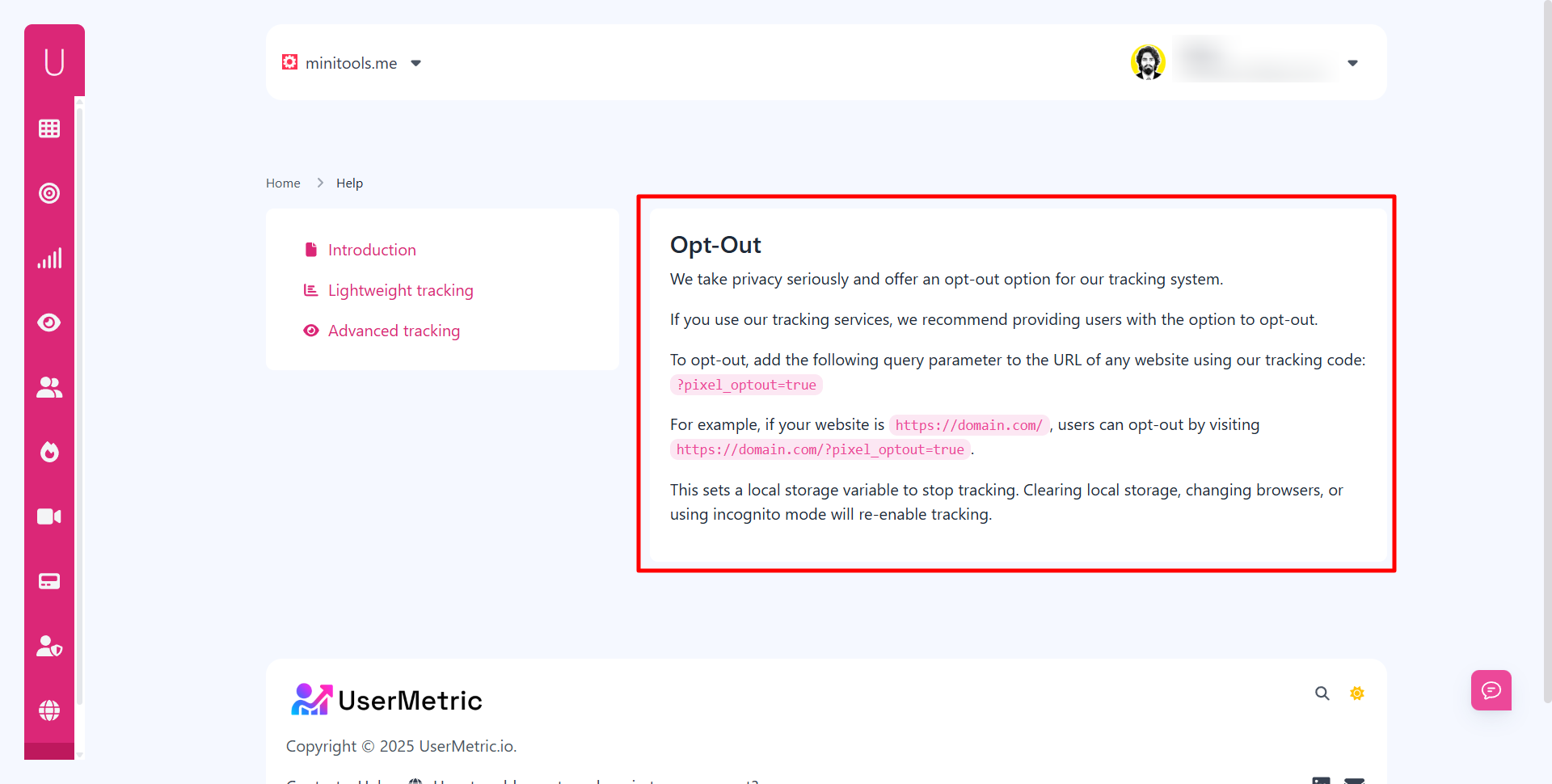
- A query parameter (like
?pixel_optout=true) added to the URL. - A cookie or local storage setting that tells the tracking script to stop.
For example, Usermetric allows users to opt out by adding a simple parameter to the URL, like ?pixel_optout=true.
Once activated, no further tracking occurs for that visitor, unless they clear their storage or switch devices.
This model provides flexibility: you still collect analytics unless the visitor explicitly objects.
Legal and Compliance Considerations for Opt-Out
Here’s where things get tricky.
Regulations like GDPR often require opt-in consent before tracking.
However, in regions where opt-out consent is legally recognized, such as under CCPA, it’s a compliant way to respect user choice.
Still, businesses must ensure:
- Transparency: users must clearly know tracking is happening.
- Accessibility: opting out must be easy and obvious.
- Enforcement: once a user opts out, tracking must immediately stop.
If these conditions aren’t met, companies risk penalties and reputational damage.
Benefits and Drawbacks of the Opt-Out Model
Like any system, opt-out tracking has strengths and weaknesses.
Benefits:
- Allows collection of rich data until users decline.
- Helps businesses maintain detailed analytics insights.
- Flexible for advanced tracking like session replays and heatmaps.
Drawbacks:
- Assumes tracking is acceptable until stopped.
- Relies on user awareness (not everyone knows how to opt out).
- May not satisfy stricter privacy laws in some regions.
For businesses that rely on behavioral analytics and detailed visitor history, opt-out offers a balance, though it comes with legal complexity.
What Is Cookieless Tracking?
If opt-out relies on user choice, cookieless tracking takes a more radical approach: it avoids storing identifiers altogether.
Instead of waiting for visitors to decline, it removes cookies from the equation entirely.
How Cookieless Analytics Collect Data Without Cookies
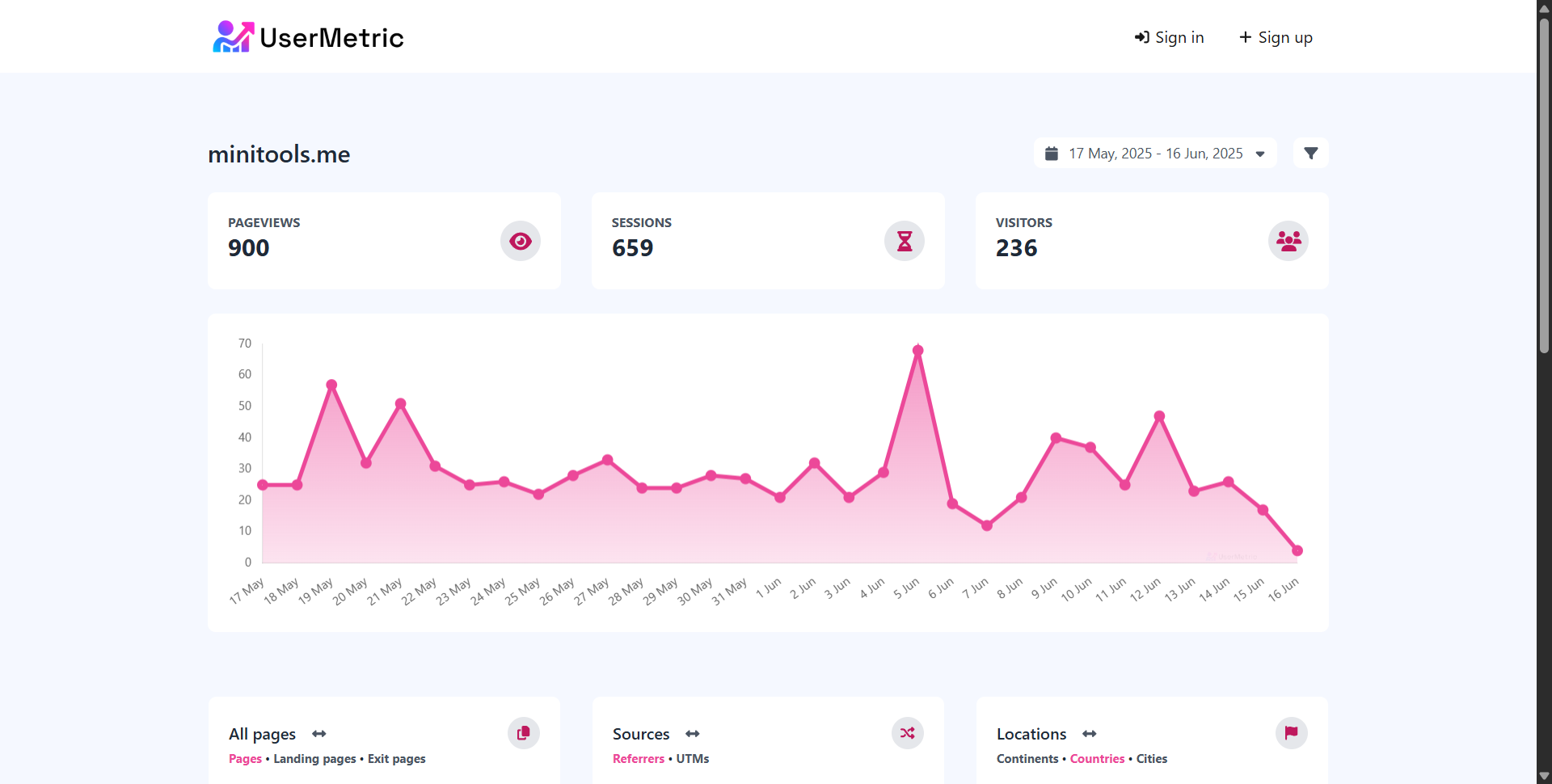
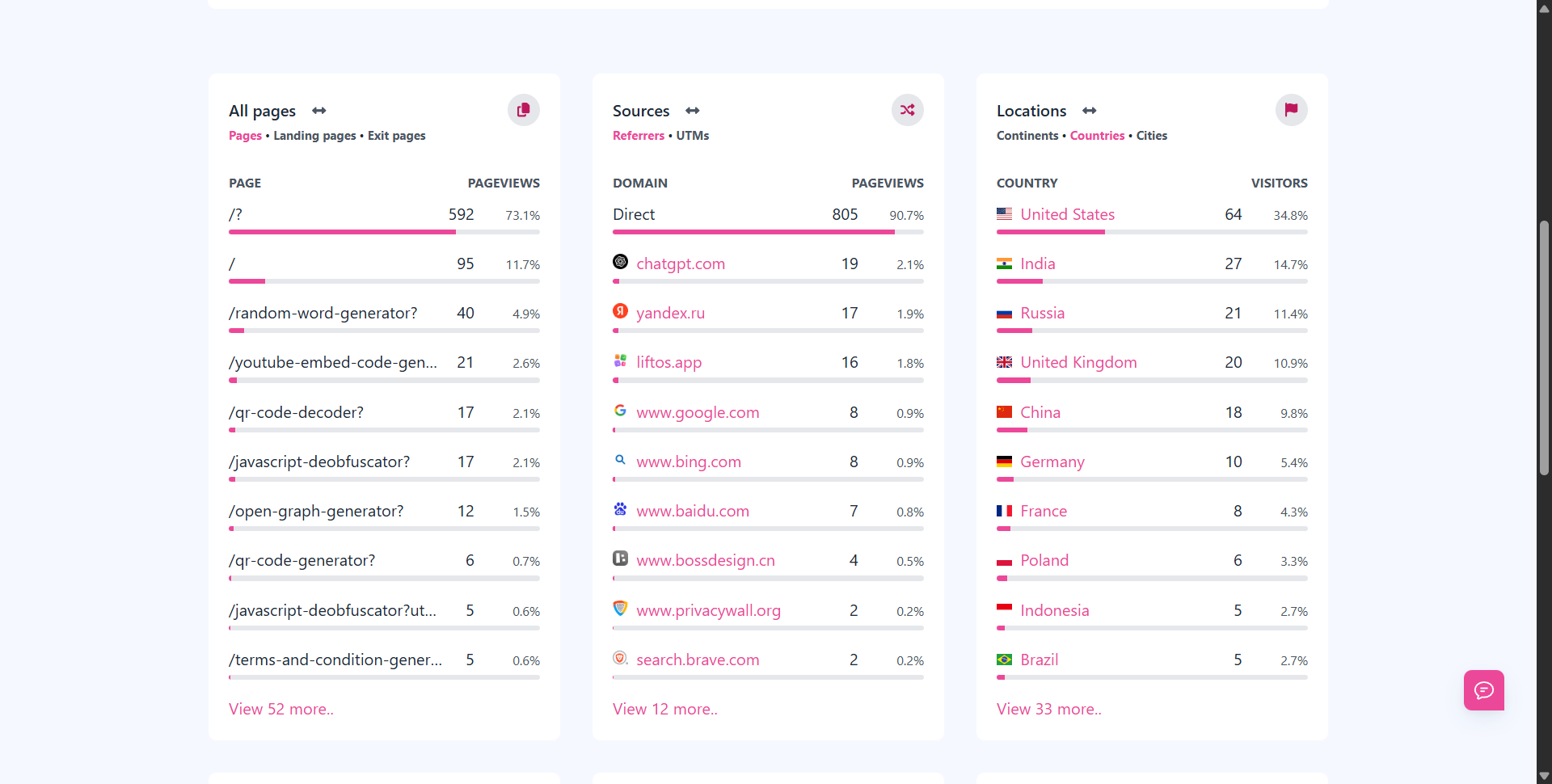
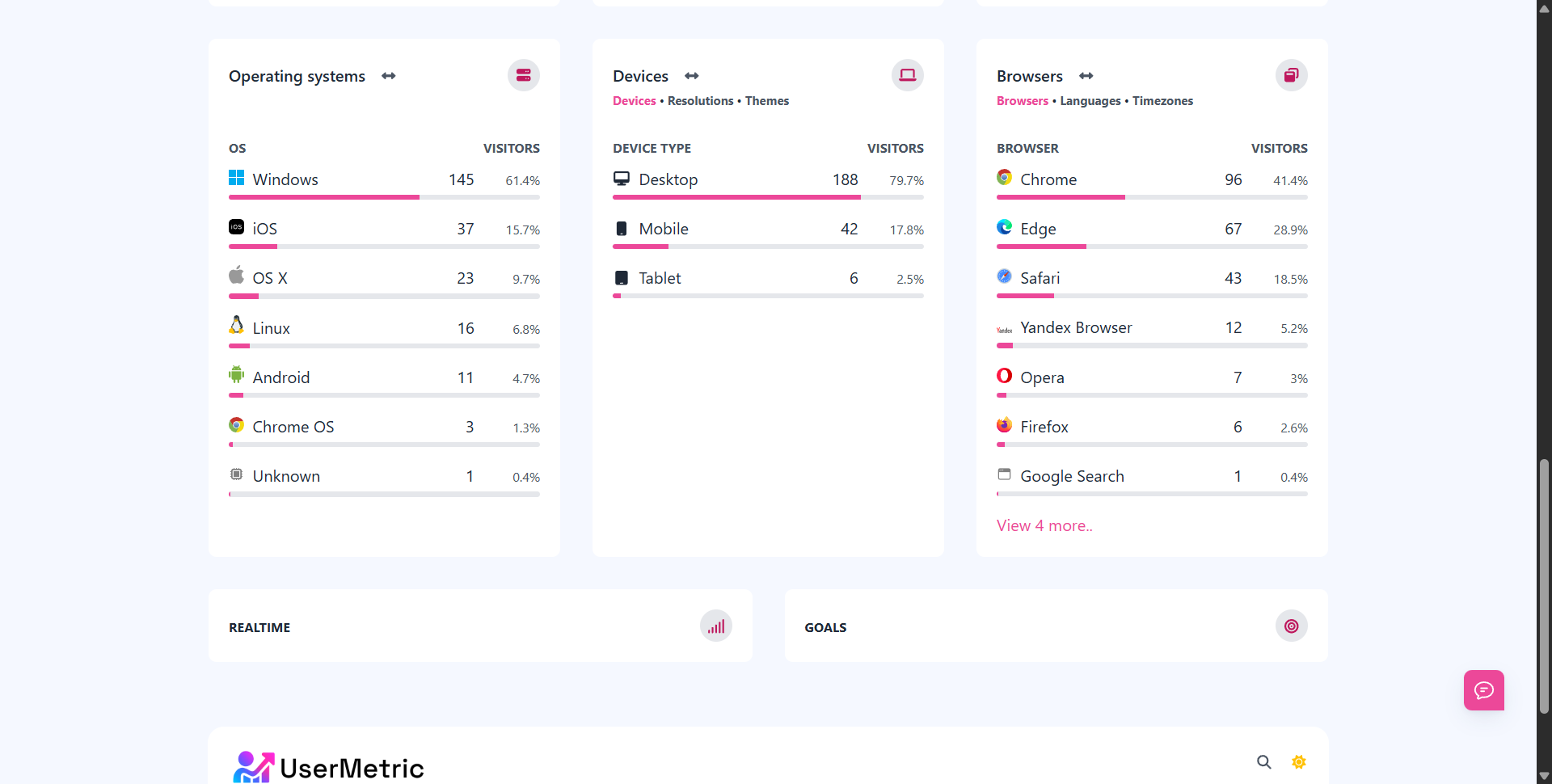
A cookieless analytics platform track activity using aggregated and anonymous data. Instead of placing a cookie on the device, they measure events like:
- Pageviews
- Referrers
- Device type and browser details
- Geographic information (at a non-identifiable level)
For instance, Usermetric’s lightweight tracking mode works without cookies or personal identifiers.
It still provides metrics like sessions, page performance, and referrer traffic, without ever tying data to an individual user.
This makes it naturally privacy-friendly and compliant with laws that restrict personal data collection.
Why Marketers Are Switching to Cookie-Free Solutions
There are two main reasons businesses are moving toward cookie-free analytics:
- Compliance – Cookieless tracking sidesteps GDPR consent requirements since no personal identifiers are stored. You don’t need intrusive banners asking for permission.
- Trust – Visitors feel more comfortable knowing they aren’t being tracked across the web. This builds credibility and reduces bounce rates caused by consent popups.
For marketers, this means they can still track what matters, traffic, campaigns, and conversions, without risking fines or alienating users.
Pros and Cons of a Cookieless Tracking Approach
Like opt-out, cookieless tracking has its trade-offs.
Advantages:
- Fully privacy-compliant in most regions.
- No need for consent banners in many cases.
- Lightweight scripts improve website performance.
- Builds user trust with transparent practices.
Disadvantages:
- Limited ability to track returning visitors.
- No session replays or heatmaps in lightweight mode.
- Less granular behavioral data compared to opt-out models.
In short, cookieless tracking is ideal for businesses prioritizing speed, simplicity, and compliance over deep user profiling.
Opt-Out Tracking vs Cookieless Tracking
Now for the big question: how do these two privacy-first approaches compare side by side?
Key Similarities Between Both Approaches
At a high level, both models aim to solve the same problem: collect data responsibly while respecting user privacy.
They share some key features:
- Both reduce reliance on traditional cookies.
- Both align with modern privacy regulations.
- Both help businesses gain trust by offering transparency.
Whether through opt-out controls or cookie-free measurement, the goal is the same, analytics without compromising user rights.
Major Differences That Impact Website Owners
This is where the approaches diverge:
- Data Collection: Opt-out starts tracking until stopped, while cookieless never uses cookies at all.
- User Control: Opt-out requires user action, cookieless is passive and automatic.
- Compliance: Cookieless often avoids consent banners, whereas opt-out may still require them in stricter regions.
- Insights: Opt-out supports advanced features (like visitor-level analytics), while cookieless focuses on aggregate data.
So, if your business needs advanced insights, opt-out offers more flexibility. But if compliance and simplicity are your top priorities, cookie-free tracking may be the safer bet.
Which Method Provides Stronger Privacy Protection?
From a pure privacy standpoint, cookieless tracking wins. It doesn’t store identifiers, doesn’t require user action, and is compliant out of the box.
Opt-out tracking, while powerful, assumes consent by default and places responsibility on the visitor to act. That can leave gaps in privacy protection.
However, in practice, the “best” approach depends on your goals. Marketers who need detailed insights may lean toward opt-out.
Privacy-focused businesses may prefer cookieless.
Luckily, with platforms like Usermetric, you don’t have to choose, you can enable lightweight cookieless tracking or use advanced opt-out tracking depending on your needs.
Business Impact of Privacy-First Analytics
The way you track visitors directly shapes your business decisions.
Analytics isn’t just about numbers, it’s about understanding your audience and acting on insights.
When you shift from traditional cookie-based tracking to privacy-focused tracking without cookies, you’ll notice changes in both accuracy and strategy.
Effects on Data Accuracy and Marketing Insights
One of the biggest debates around opt-out tracking and cookieless solutions is data accuracy.
- Opt-Out Tracking gives you more precise user-level data because it can link sessions and behaviors across time, unless users disable it.
- Cookieless Analytics provides aggregated, anonymous insights. While highly accurate for pageviews and sessions, it won’t tell you who returned to your site.
Here’s a quick comparison:
| Feature | Opt-Out Tracking | Cookieless Analytics |
|---|---|---|
| Visitor-Level Insights | Yes (if user has not opted out) | No (anonymous only) |
| Returning Visitor Recognition | Yes | No |
| Advanced Features (heatmaps, replays) | Yes | Limited / Not available |
| Accuracy on Aggregate Metrics | High (but subject to opt-outs) | High (for non-personal data) |
For marketers, this means opt-out can fuel more detailed campaign analysis, while cookieless ensures broader compliance with minimal friction.
Balancing Compliance and Customer Experience
It’s not just about the data, it’s about how users feel. Pop-ups asking for cookie consent often frustrate visitors. Many leave rather than click “accept.”
With cookie-free analytics, you often avoid these banners altogether, creating a smoother experience.
Meanwhile, opt-out models require you to present clear opt-out mechanisms, which can sometimes add complexity to the user journey.
Striking the right balance is critical:
- Too intrusive, and you lose trust.
- Too hands-off, and you risk missing valuable data.
That’s why many businesses mix approaches, using cookieless tracking for general insights and opt-out tracking for advanced analysis when users permit it.
Choosing the Right Method for Your Website
Deciding between these models depends on your priorities.
Ask yourself:
- Do I need detailed visitor histories? → Consider opt-out tracking.
- Do I want compliance without consent banners? → Go with cookieless analytics.
- Do I serve users in strict regions like the EU? → Lean toward cookie-free measurement.
- Do I run experiments or product analysis? → Opt-out will give you more depth.
👉 Pro Tip: You don’t have to pick one forever.
Platforms like Usermetric let you switch between lightweight cookieless and advanced opt-out tracking depending on your current needs.
Usermetric as a Privacy-Focused Analytics Solution
Not all analytics platforms handle privacy the same way.
Many claim compliance but still store identifiers in ways that raise concerns. Usermetric, however, was built with privacy-first design at its core.
It provides two tracking modes, supports Do Not Track (DNT), and complies with major regulations like GDPR, CCPA, and PECR.
Let’s break down what this looks like.
Lightweight Tracking Mode With Cookieless Analytics
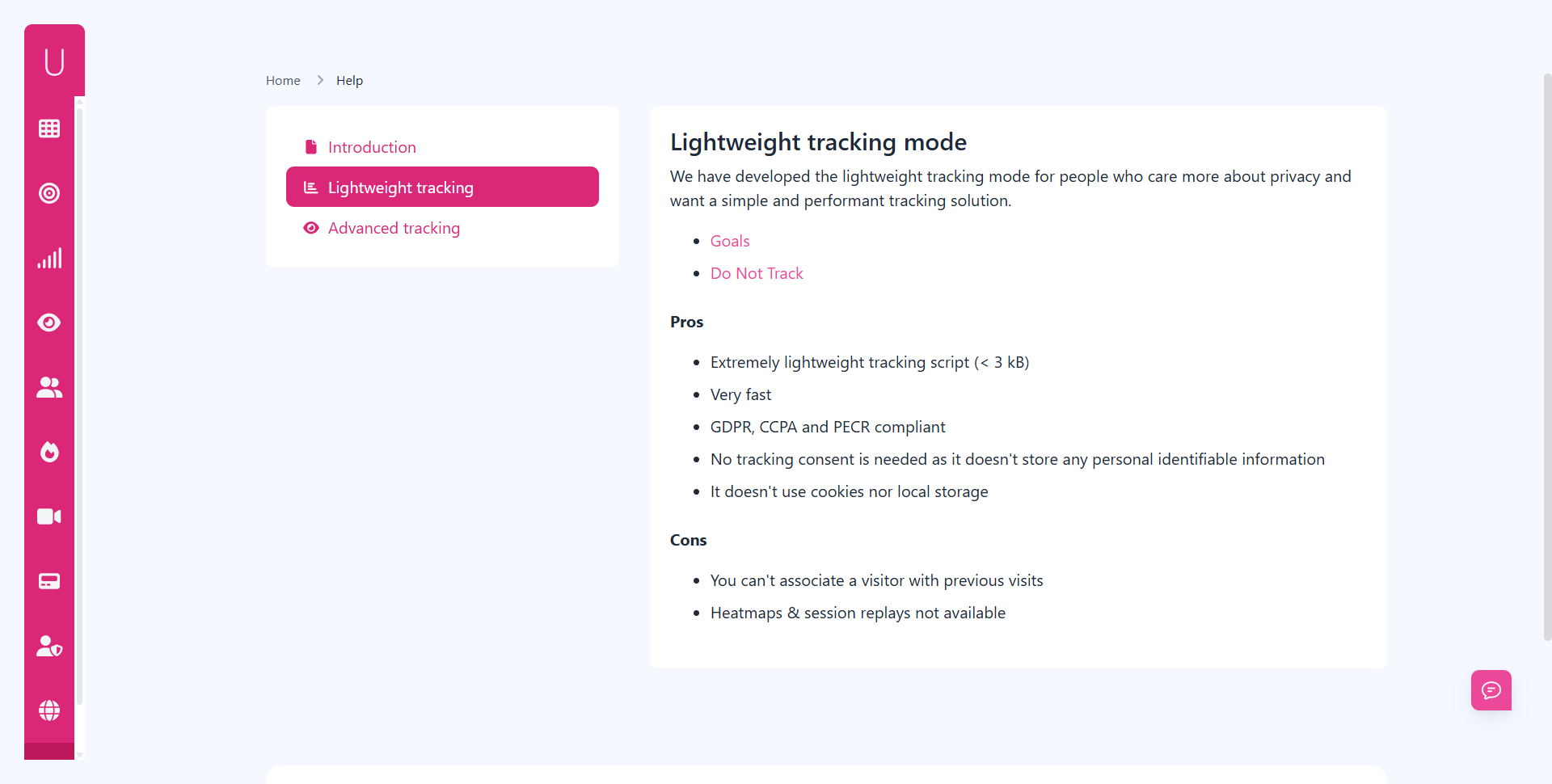
In lightweight mode, Usermetric collects anonymous data without cookies or local storage. This makes it:
- Extremely lightweight (just 2.7 kB script).
- Consent-free in most regions.
- Perfect for fast websites and performance-first projects.
You’ll still get valuable insights such as:
- Pageviews and sessions.
- Referrers and UTMs.
- Devices, browsers, and locations.
But since this mode avoids identifiers, you won’t see session replays or visitor histories.
Advanced Tracking Mode With Opt-Out Options
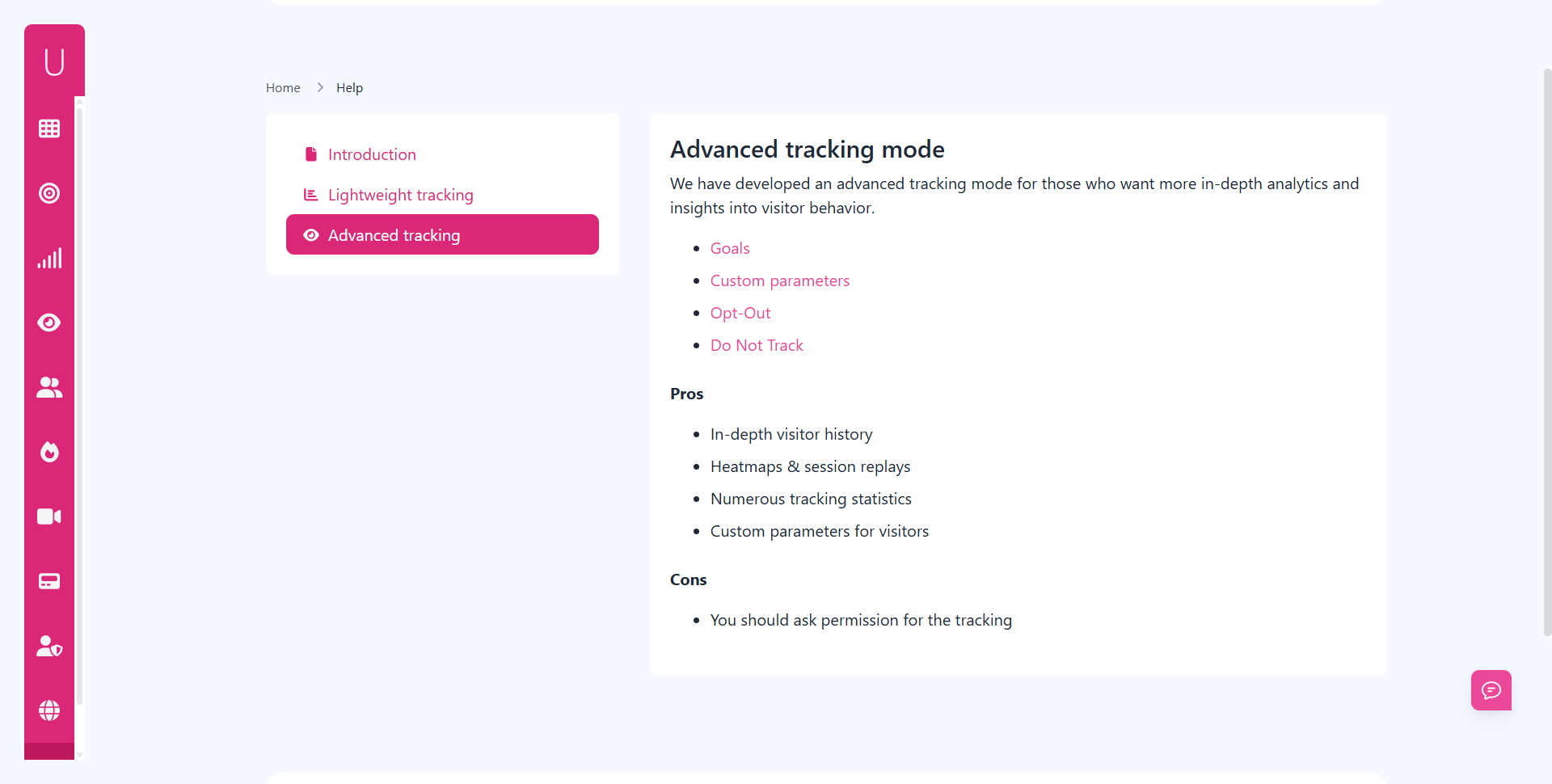
When businesses need deeper analytics, Usermetric offers advanced tracking. Here, you can:
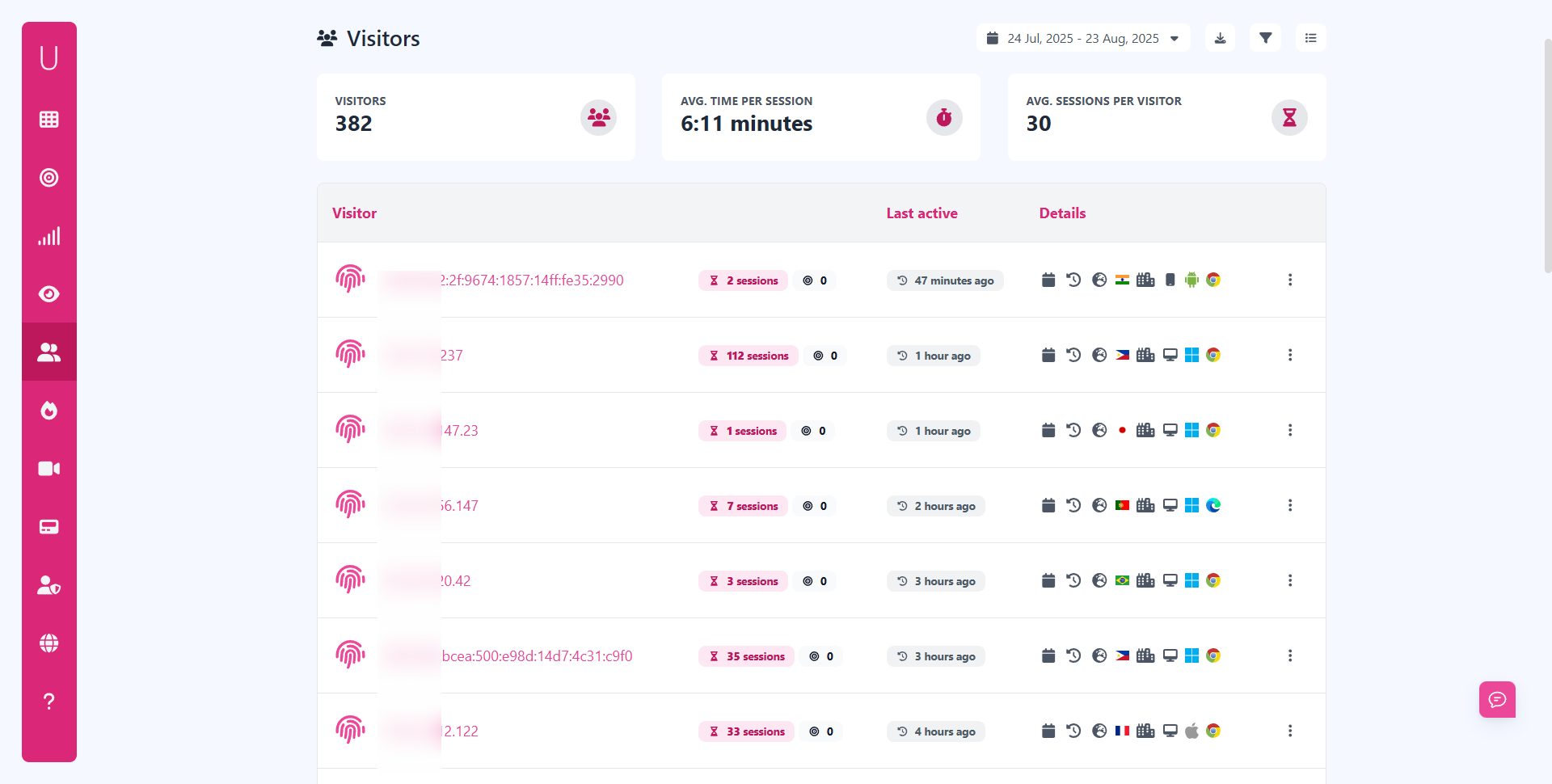
- Track visitor journeys.
- Enable heatmaps and session recordings.
- Use custom parameters to identify logged-in users.
At the same time, users can opt out by triggering a local setting (like ?pixel_optout=true). This gives businesses detailed insights while still respecting individual privacy rights.


How Usermetric Honors Do Not Track (DNT) Requests
Many browsers include a DNT setting. While not all websites honor it, Usermetric does.
If a visitor has DNT enabled, tracking automatically stops.
For site owners who want full control, Usermetric also provides the option to ignore DNT by adjusting the script with data-ignore-dnt="true".
This flexibility ensures you meet both regulatory and business needs.
Compliance With GDPR, CCPA, and PECR Standards
Usermetric doesn’t just “say” it’s compliant, it’s designed for it:
- GDPR: No personal data stored in cookieless mode.
- CCPA: Full support for opt-out (“Do Not Sell My Info”) requests.
- PECR: Consent-free measurement where cookies are avoided.
“Usermetric lets you focus on growth while staying compliant, no legal headaches, no confusing consent flows.”
This dual-mode design (opt-out + cookieless) means businesses can remain flexible without sacrificing trust.
Future of Web Tracking and Privacy
The future of analytics is privacy-first. But how exactly will that play out? Let’s look ahead.
The Decline of Third-Party Cookies
Google has announced plans to phase out third-party cookies, following in the footsteps of Safari and Firefox.
Once they’re gone, cookie-based ad targeting and analytics will decline significantly.
Businesses relying on traditional methods will be forced to adopt alternatives. Both opt-out tracking and cookieless solutions will become more common as cookies vanish.
Will Opt-Out Mechanisms Stay Relevant?
Yes, but with caveats.
Opt-out models work best where user control is legally mandated, such as under CCPA.
As privacy laws spread, opt-out will remain relevant, especially for advanced analytics that require identifiers.
However, the burden is shifting: regulators and browsers increasingly prefer opt-in or no cookies at all. This may limit opt-out’s long-term dominance.
Why Cookieless Tracking Is Becoming the New Normal
Cookieless analytics offers a default privacy advantage. By removing identifiers entirely, it:
- Eliminates consent headaches.
- Provides transparency without pop-ups.
- Future-proofs your analytics against regulation changes.
That’s why cookieless is quickly becoming the industry standard. It aligns with where browsers, laws, and user expectations are heading.
Final Thoughts
So, which protects users best: opt-out tracking or cookieless analytics?
- From a privacy-first perspective, cookieless clearly takes the lead.
- From a data insight perspective, opt-out delivers more depth.
- From a business flexibility perspective, having both is ideal.
With Usermetric, you don’t have to choose.
You can start with lightweight, cookie-free analytics and upgrade to advanced opt-out tracking when needed, all while staying GDPR, CCPA, and PECR compliant.
In a world where trust is everything, that flexibility is a game changer.
FAQs
Is cookieless tracking 100% anonymous?
Yes. Cookieless analytics avoids storing identifiers like IPs or cookies. It only collects aggregated, non-personal data.
Does opt-out tracking require user consent?
It depends on the region. Under GDPR, explicit opt-in may still be required. Under CCPA, opt-out is valid as long as clear mechanisms exist.
Can I use both opt-out and cookieless tracking together?
Yes. Platforms like Usermetric let you run cookieless analytics for compliance and enable opt-out mode for advanced tracking.
Will cookieless analytics hurt my marketing insights?
Not necessarily. While you lose some user-level detail, you still get reliable data on traffic, campaigns, and conversions, enough for most businesses.
Why should I choose Usermetric over other tools?
Because it’s built for privacy-first analytics. You get both lightweight, consent-free tracking and advanced features with opt-out support, without compromising compliance.


