
Want to track your website’s performance without breaking the law?
If you’re operating in the EU or have users from there, GDPR compliance isn’t optional.
You need analytics that respect privacy, ask for consent when required, and don’t store or misuse personal data.
But here’s the catch: most analytics tools weren’t built for privacy-first tracking.
This guide shows you how to stay legal, protect user data, and still get all the marketing insights you need using GDPR compliant analytics.
Let’s break it down step by step.
Understanding GDPR and Its Impact on Analytics
What Is GDPR and Why It Matters
The General Data Protection Regulation (GDPR) is the EU’s data privacy law that came into force in May 2018.
It sets clear rules about how businesses collect, process, and store personal data of EU residents.
If your website collects any data from visitors in the EU, even if you’re not based there, you’re subject to GDPR.
Here’s what GDPR means in plain terms:
- You must be transparent about what data you collect.
- You must ask for consent before tracking.
- You must store data securely and only for as long as necessary.
- You must give users control over their data (access, delete, correct).
The penalty for ignoring GDPR? Fines of up to €20 million or 4% of global revenue, whichever is higher. Yes, even for small websites.
So, it matters. A lot.
How GDPR Affects Website Analytics
Website analytics tools often collect information like:
- IP addresses
- Device and browser details
- Page visits and behavior
- Location data
- Unique user identifiers (often via cookies)
Under GDPR, many of these are classified as personal data.
This means using tools like Google Analytics (especially the older Universal Analytics) without proper consent can put you at legal risk.
Here’s how analytics gets affected:
- Cookies require explicit consent before tracking.
- IP addresses must be anonymized or not stored at all.
- User IDs or session data must be pseudonymized.
- You must disclose tracking in your privacy policy.
Most importantly: You can’t collect data unless you have a legal basis, like consent or legitimate interest (and even that has limits).
Key GDPR Principles for Data Collection
To build GDPR compliant analytics, your tool must follow these core principles:
Lawfulness, Fairness, and Transparency
- Tell users what you collect and why.
- Don’t hide data collection behind vague language.
Purpose Limitation
- Only collect data for specific, lawful reasons.
Data Minimization
- Collect only the data you actually need.
Accuracy
- Make sure the data is correct and up to date.
Storage Limitation
- Don’t store data longer than necessary.
Integrity and Confidentiality
- Keep data secure and protected.
Accountability
- You’re responsible for compliance and must document it.
A GDPR compliant web analytics tool must help you follow all these. Anything less is risky.
Why GDPR Compliant Analytics Is Essential for Your Business
Protecting User Privacy and Building Trust
Users care about privacy more than ever. The days of passive tracking are over.
With rising awareness and tools like ad blockers and cookie banners, people are actively choosing what they share.
Using a GDPR compliant analytics tool shows your users that:
- You respect their privacy choices.
- You’re transparent about data collection.
- You’re not selling or misusing their information.
This builds trust and trust leads to more signups, conversions, and loyal users. In short, privacy is good business.
Avoiding Hefty GDPR Fines and Penalties
The legal risks are real. Big companies have been fined millions, but small businesses aren’t immune either.
Fines depend on the nature and duration of the violation, even if it was unintentional.
You could be fined for:
- Not having a cookie banner
- Tracking without valid consent
- Using third-party tools that process data outside the EU
- Failing to delete user data on request
The cost of non-compliance isn’t just monetary, it also includes reputational damage and lost user trust.
Enhancing Brand Reputation in the EU Market
Privacy is a competitive advantage.
European users are especially cautious, and if you’re serious about entering or expanding in the EU market, GDPR compliance is not a checkbox, it’s a strategy.
Being transparent about your analytics setup:
- Differentiates your brand from shady competitors
- Helps you comply with cookie laws, like PECR and ePrivacy
- Improves your chances of being featured, linked, and recommended
- Shows regulators and users you take privacy seriously
In a privacy-conscious market, this can be the edge that sets you apart.
Features of GDPR Compliant Analytics Tools
Consent Management and User Permissions
A compliant tool gives you full control over user consent.
This means:
- No tracking before consent
- Built-in integrations with Consent Management Platforms (CMPs)
- Respect for browser settings like “Do Not Track”
- Granular permissions for different tracking types (e.g., marketing vs. essential)
Consent should be freely given, specific, informed, and unambiguous. A vague banner that says “By using this site you agree…” won’t cut it.
Also, you must log and store consent choices in case regulators ask.
Data Anonymization and Pseudonymization
GDPR doesn’t just ban data collection, it lets you collect data safely.
Two common techniques:
- Anonymization: Removes personal identifiers permanently. The data can’t be traced back to anyone.
- Pseudonymization: Replaces personal identifiers with tokens or hashes. You can link it back only with a separate key.
Compliant analytics tools apply these techniques to:
- IP addresses
- Device IDs
- Session data
- Location tracking
Bonus: If your data is anonymized, you might not even need consent, because it’s not personal data anymore.
Transparent Data Processing and Storage
Your analytics tool should clearly tell you:
- What data is being collected
- Where it’s stored (preferably in the EU)
- Who has access to it
- How long it’s retained
- Whether it’s shared with third parties
This transparency is essential for:
- Writing an accurate privacy policy
- Responding to user data requests
- Passing GDPR audits
Also, tools that don’t use cookies or store IPs make compliance easier. You avoid the hassle of banners, consent logs, and audits.
Top GDPR Compliant Analytics Tools for Small Businesses and Bloggers
Not all analytics tools are built with privacy in mind. In fact, many default to invasive tracking methods that violate GDPR out of the box.
But there’s good news, several analytics platforms today offer GDPR compliance by design.
Let’s explore four top tools that are perfect for small businesses, bloggers, and startups looking for legal, ethical, and reliable website tracking.
Usermetric: Privacy-First Analytics Tool
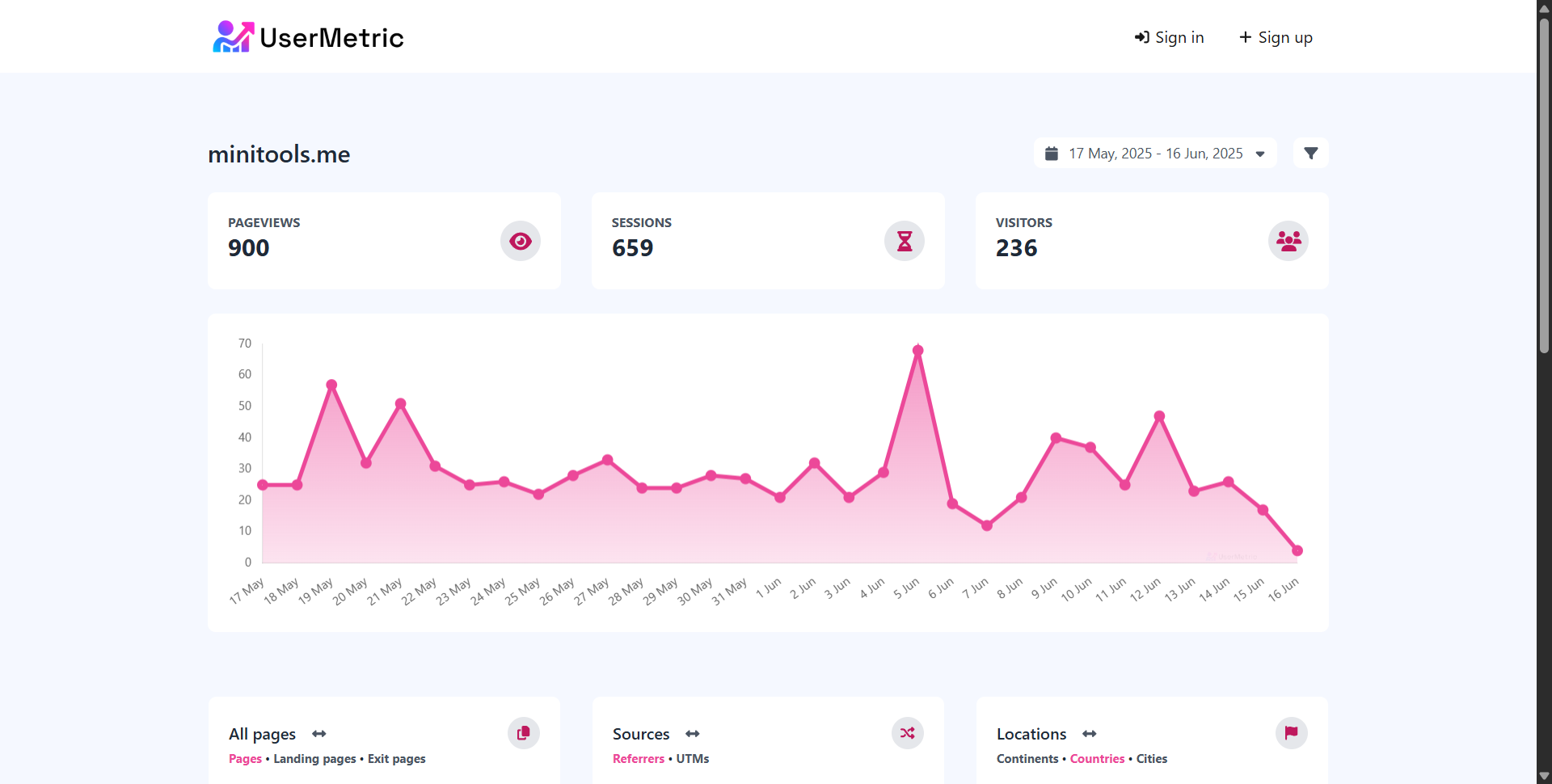
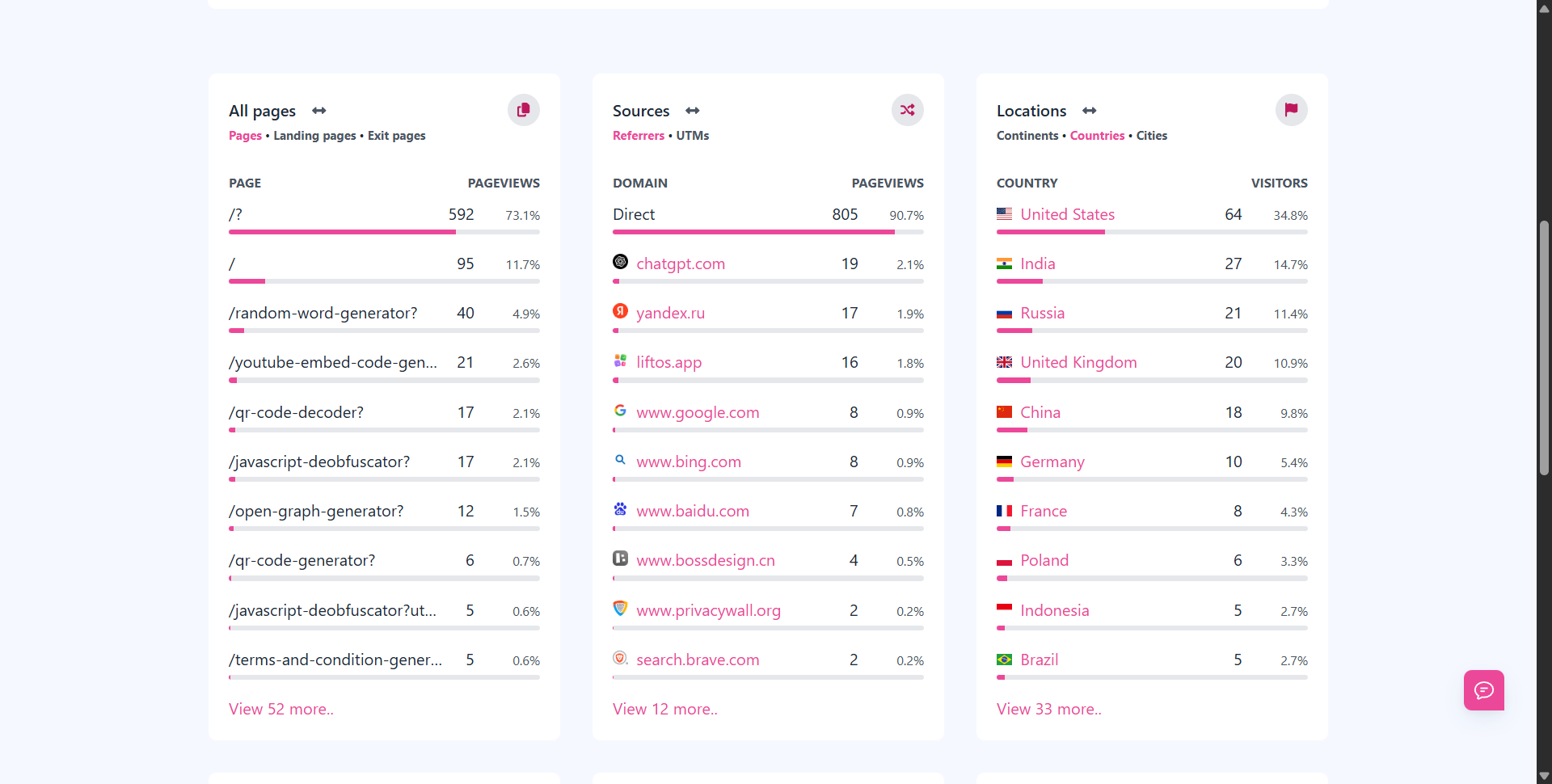
Usermetric is a lightweight, privacy-first analytics platform built to comply with GDPR, CCPA, and PECR without relying on cookies.
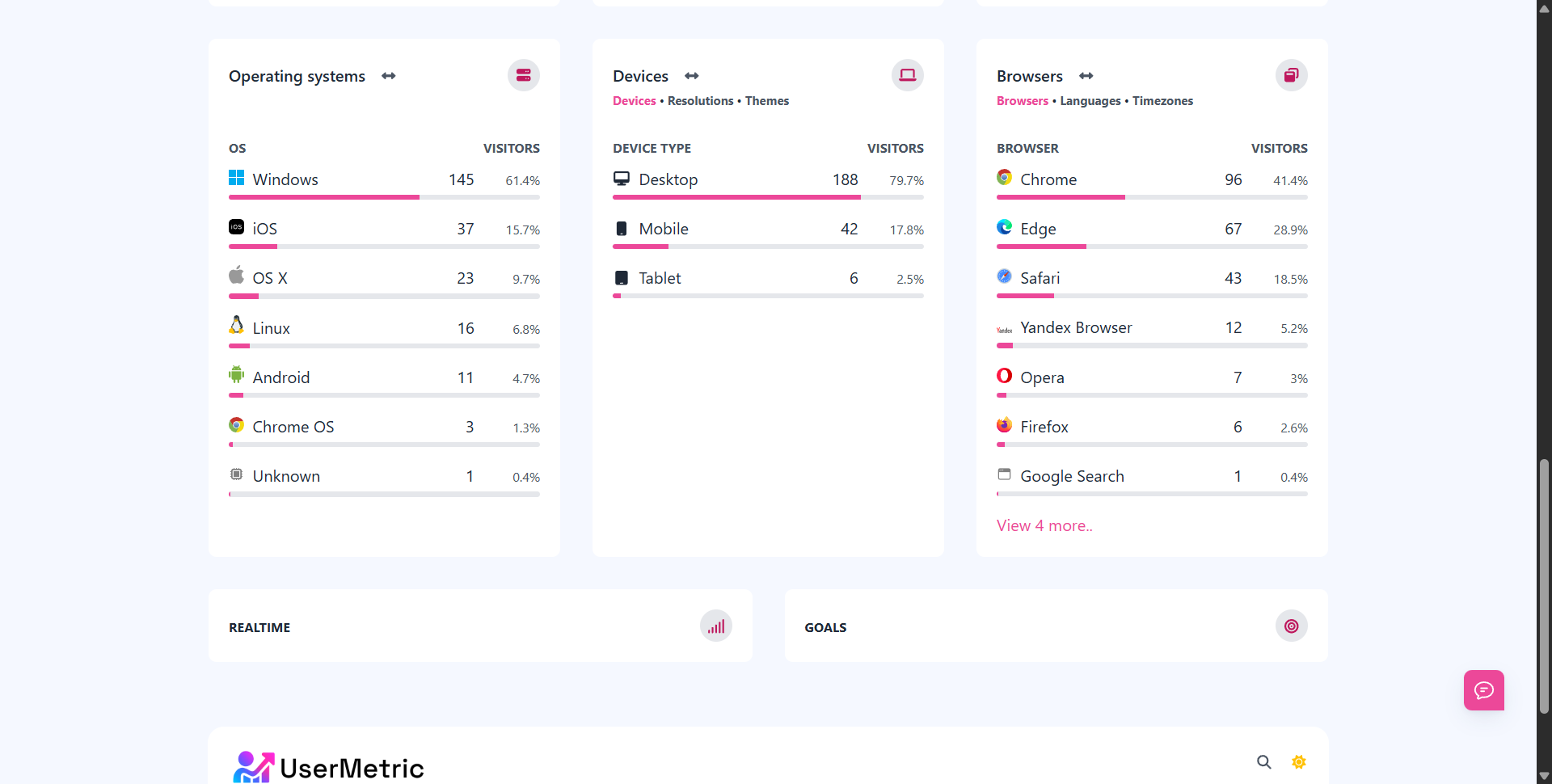
✅ Key Features:
- No cookies, no tracking consent needed in lightweight mode
- IP anonymization and Do Not Track (DNT) support
- Fully GDPR compliant with cookie-free session tracking
- Advanced mode with session replay, heatmaps, and visitor behavior tracking (requires consent)
- Built-in UTM tracking, goals, and conversion tracking
“Usermetric is a great choice if you want to track performance without collecting personal data. It’s fast, easy to install, and privacy is baked into the core.”
Privacy-focused website owner
With a 2.7KB script, it loads incredibly fast and doesn’t affect your Core Web Vitals.
Plus, it offers team access, email reports, public dashboards, and white-labeling, perfect for agencies and SaaS teams.
📊 Comparison Chart:
| Feature | Usermetric | Matomo | Fathom | Plausible |
|---|---|---|---|---|
| Cookie-free option | ✅ | ❌ | ✅ | ✅ |
| EU hosting available | ❌ | ✅ | ✅ | ✅ |
| Consent not required | ✅* | ❌ | ✅ | ✅ |
| Advanced analytics | ✅** | ✅ | ❌ | ❌ |
* in lightweight mode
** session replay, heatmaps (advanced tracking mode)
Matomo: Open-Source and Privacy-Focused
Matomo is a robust, open-source analytics tool that’s designed to give you full control over your data.
✅ Highlights:
- Self-hosted option for 100% data ownership
- Full support for IP anonymization and opt-out
- Advanced features like funnel tracking, A/B testing, and form analytics
- Integration with CMPs for cookie consent management
However, Matomo does use cookies by default, so you’ll need to configure consent banners if you go this route.
It’s a powerful platform, but it may be overkill for bloggers or small sites.
🟡 Ideal for businesses with dev resources and need for detailed reporting.
Fathom Analytics: Simple and Compliant
Fathom is a minimalist analytics tool focused on simplicity, speed, and compliance.
✅ Benefits:
- No cookies and no personal data collection
- Built-in EU isolation and bypasses consent banners legally
- Clean, readable dashboard for quick insights
- One-line install with privacy-by-default
Fathom is excellent for site owners who want clear traffic reports without tracking headaches. However, it lacks deep metrics like custom events, conversions, or session analysis.
🟢 Perfect for bloggers and solo creators who care about privacy and simplicity.
Plausible Analytics: Lightweight and EU-Based
Plausible is an open-source analytics tool hosted in the EU and optimized for speed, transparency, and GDPR compliance.
✅ Key Points:
- Cookie-free by default, no consent required
- Open-source and transparent development
- Hosted in EU-based servers (Germany)
- Tracks pageviews, sources, bounce rates, and goals
It integrates easily with most platforms and works well for publishers and privacy-conscious startups.
It doesn’t track visitors personally, so you won’t get individual-level insights, but that’s by design.
🟢 A great balance of privacy, ease of use, and transparency.
How GDPR Compliance Benefits SaaS and E-Commerce Businesses
SaaS platforms and online stores handle sensitive customer data daily.
GDPR-compliant analytics not only protect user rights but also support growth, legal safety, and trust.
Streamlining Customer Trust in SaaS Platforms
Customers need confidence that their data is handled responsibly.
With compliant analytics, SaaS founders can:
- Reassure clients during onboarding
- Display trust badges (e.g., “GDPR Compliant” on pricing pages)
- Offer privacy-conscious data insights to customers
“Trust is currency in SaaS. Complying with GDPR tells users, ‘Your data is safe here.’ That’s a strong conversion lever.”
It also helps attract EU clients, partners, and vendors who often require compliance verification during due diligence.
Ensuring Compliance in E-Commerce Transactions
E-commerce businesses process personal data in every purchase:
- Names
- Addresses
- Payment details
- Device/browser info
Pairing a GDPR-compliant analytics tool with a privacy-focused checkout process strengthens legal protection and customer experience.
You avoid shady retargeting methods and instead focus on clean, intent-driven tracking like:
- Conversion goals
- Funnel drop-off
- Product performance by campaign (via UTM tracking)
Tools like Usermetric and Matomo can provide compliant insights into what’s working and what’s not, without breaching data laws.
Reducing Legal Risks for Global Operations
If you’re serving users across borders, legal risk multiplies. GDPR compliance reduces exposure by:
- Preventing unauthorized cross-border data transfers
- Avoiding regulatory audits or takedown notices
- Helping your legal and marketing teams stay aligned
It’s cheaper to implement compliant analytics now than to clean up after a breach or fine later.
“The most expensive data is the one collected illegally.” — EU Data Protection Board
Steps to Implement GDPR Compliant Analytics on Your Website
Ready to stay legal and track smarter? Here’s a clear path to implementation.
Conducting a Data Audit for Compliance
Before you switch analytics platforms, analyze your current setup.
📝 Checklist:
- What tools are collecting visitor data?
- Are cookies used? Which ones?
- Are IP addresses or session IDs stored?
- Is consent being properly collected and logged?
- Are third parties accessing this data?
Use this audit to map out risks, remove outdated scripts, and clean your privacy policy.
Choosing the Right Analytics Tool
Pick a tool based on:
| Criteria | Why It Matters |
|---|---|
| GDPR compliance status | Must be transparent about privacy features |
| Hosting location | Prefer EU-hosted or self-hosted tools |
| Consent requirements | Cookie-free options simplify legal compliance |
| Features and scalability | Choose based on your growth and reporting needs |
| Ease of installation | Look for one-liner or tag manager integration |
✅ Usermetric is ideal if you want speed, privacy, and advanced features
✅ Plausible or Fathom for clean, cookie-free traffic tracking
✅ Matomo for large teams needing full control and deeper metrics
Setting Up Cookie Consent Pop-Ups
If your tool still uses cookies (or you want to use advanced features), you’ll need a cookie consent mechanism.
Steps:
- Choose a Consent Management Platform (CMP) like CookieYes, Cookiebot, or Osano.
- Add a cookie banner that complies with GDPR requirements:
- Clear options (Accept / Reject)
- Link to privacy policy
- No pre-checked boxes
- Integrate your CMP with your analytics tool. Many platforms support blocking the script until consent is given.
⚠️ Tip: For tools like Usermetric in lightweight mode, you can skip this step since it doesn’t store any personal data or use cookies.
Common Mistakes to Avoid with GDPR Analytics
Even well-meaning businesses slip up with GDPR compliance. The rules are clear, but the implementation? That’s where most websites go wrong.
Let’s explore the most common mistakes that can put your business at risk and how to avoid them.
Ignoring User Consent Requirements
One of the most overlooked parts of GDPR is obtaining clear user consent before collecting data, especially if your analytics tool uses cookies or tracks identifiable information.
❌ Mistake:
Automatically running analytics scripts without a cookie banner.
✅ Solution:
Use cookie-free website analytics, like Usermetric in lightweight mode to skip consent entirely.
If you’re using cookies, integrate a GDPR-compliant consent pop-up and block the script until the user opts in.
Remember: consent must be freely given, specific, informed, and unambiguous. Pre-ticked boxes or vague “by continuing you accept” banners won’t cut it.
Using Non-Compliant Third-Party Tools
Many websites use plugins, widgets, or third-party scripts that track data behind the scenes, without informing users.
❌ Mistake:
Embedding a video player or chatbot that sets cookies without consent, or using legacy Google Analytics (Universal Analytics) which violates EU rules.
✅ Solution:
- Audit your site for third-party scripts.
- Remove or replace any that do not meet GDPR requirements.
- Choose tools that clearly state their compliance approach, like Plausible, Fathom, or Usermetric.
Failing to Update Privacy Policies
Your privacy policy isn’t a one-time setup, it needs to reflect what your site actually does.
❌ Mistake:
Using a generic or outdated privacy policy that doesn’t explain what data you collect, why, and how users can manage it.
✅ Solution:
- List all analytics tools you use.
- Mention cookie usage, data storage periods, and the user’s right to opt-out.
- Include contact info for data access or deletion requests.
Pro tip: Update your privacy policy every time you change your analytics setup.
GDPR Compliant Analytics for EU Website Owners
If your business operates in the EU or your audience is based there, you need to follow additional country-level rules beyond GDPR.
Let’s cover what you should know.
Understanding EU-Specific Data Protection Rules
While GDPR is EU-wide, some countries have additional privacy regulations, especially around cookie usage and consent enforcement.
Examples:
- France (CNIL): Strict cookie consent enforcement. Sites using tracking cookies without prior consent have been fined.
- Germany (TTDSG): Consent must be obtained for almost all types of cookies.
- Netherlands (AP): Requires user consent before storing or accessing any non-essential data.
✅ Action Tip:
Use geo-targeted consent banners to comply with these country-specific rules, or switch to website analytics that need no cookie banner like Usermetric or Plausible that works universally.
Best Practices for EU User Data Handling
GDPR gives users control over their data, and you need systems in place to honor that.
Best practices include:
- Right to access: Users can request a copy of their data.
- Right to delete: Users can ask for their data to be erased.
- Right to inform: Users should know what data is collected/not collected about them.
✅ Implement a request form or contact email in your privacy policy for these actions.
Also, remember the data minimization principle: if you don’t need it, don’t collect it.
Tools Tailored for EU Compliance
Choosing a tool hosted in the EU or built with the region’s rules in mind gives you an automatic edge.
Top picks:
- Usermetric: GDPR, PECR, and CCPA compliant, and a private web analytics tool.
- Plausible: EU-based servers in Germany, no personal data stored.
- Fathom: Offers EU isolation routing, even if you’re outside the EU.
- Matomo: Self-hosting option available for full data control.
Look for tools that explicitly state “no personal data is stored”.
Measuring Success with GDPR Compliant Analytics
GDPR doesn’t stop you from measuring growth, it just changes how you do it. You can still gather valuable insights without collecting sensitive user data.
Tracking Key Metrics Without Compromising Privacy
With privacy-first tools, you can track:
- Pageviews
- Sessions (cookie-free in some tools like Usermetric)
- Top referrers and UTM campaigns
- Bounce rates and landing pages
- Conversions and goal completions
✅ These metrics help answer critical questions:
- Which content performs best?
- Where do users drop off?
- Which campaigns bring quality traffic?
- Are users taking action (signup, download, purchase)?
The difference? These are aggregated insights, not tied to individuals.
Balancing Data Insights with Compliance
Sometimes marketers think: “But GDPR limits everything!” Not quite.
You just need to shift focus from who the visitor is to what they’re doing in the moment.
Old mindset:
Track users across multiple visits, build behavioral profiles, retarget based on actions.
New mindset:
Measure page-level performance, understand session behavior anonymously, optimize based on trends, not identities.
Privacy and performance don’t have to be enemies. With the right tools, they work hand in hand.
Reporting and Accountability Under GDPR
If regulators audit your business, you need to prove your analytics process is compliant.
Make sure you have:
- Consent logs (if using cookies)
- A data processing agreement (DPA) with your analytics provider
- A clear audit trail showing what data is collected, how it’s stored, and how it’s protected
- An up-to-date privacy policy and cookie policy
- Processes for handling data deletion and access requests
✅ Tip: Many GDPR-friendly tools like Usermetric provide simplified reporting and public stats pages, which you can share with stakeholders or clients.
Final thoughts
GDPR compliant analytics isn’t just about avoiding fines, it’s about building a trustworthy and transparent brand in a privacy-conscious world.
By choosing the right tool, updating your data practices, and respecting user consent, you can collect meaningful insights without crossing legal lines.
Final checklist to wrap things up:
- ✅ Use a GDPR compliant, cookie-free analytics tool
- ✅ Update your privacy policy and cookie banners
- ✅ Avoid storing personal data unless absolutely necessary
- ✅ Choose EU-based or self-hosted solutions when possible
- ✅ Focus on actionable metrics, not personal identifiers
- ✅ Stay transparent and accountable in your data handling
Whether you’re a blogger, SaaS founder, or e-commerce brand, a web analytics without collecting personal data is your safest, and smartest path forward.
FAQs
What is GDPR compliant analytics?
GDPR compliant analytics refers to website data tracking that follows the EU’s General Data Protection Regulation. It avoids collecting personal data without consent and uses privacy-first methods like anonymized tracking.
Why do I need GDPR compliant analytics for my website?
If your website has visitors from the EU, you’re legally required to comply with GDPR. Using non-compliant analytics tools can lead to fines, legal issues, and loss of user trust.
Do I still need user consent with GDPR compliant analytics?
It depends on the tool. Platforms like Usermetric (in lightweight mode), Fathom, or Plausible don’t use cookies or personal data, so consent may not be needed. If cookies are used, explicit consent is required.
Can I track user behavior without violating GDPR?
Yes, but only if the tracking is anonymized or pseudonymized. Tools like Usermetric (advanced tracking mode) allow behavior tracking with proper consent in place.
What metrics can I track with GDPR compliant analytics?
You can track key metrics like pageviews, sessions, traffic sources, landing pages, bounce rates, exit pages, conversions, and campaign performance—all without violating user privacy
What happens if I use non-compliant analytics on my site?
You may face fines up to €20 million or 4% of annual global turnover, especially if you process EU user data without proper consent or transparency.
Is it possible to get useful insights without tracking users?
Absolutely. Tools like Usermetric in lightweight mode offer valuable session-level and pageview insights without storing personal data, helping you make decisions while respecting privacy.
Do I need a privacy policy for GDPR compliant analytics?
Yes. Even if your analytics tool is GDPR friendly, your privacy policy must clearly explain what data is collected, how it’s used, and users’ rights under GDPR.


