
You shouldn’t have to choose between website insights and user privacy.
Yet, most analytics platforms make you do exactly that.
Cookie banners slow down your site, annoy visitors, and in many cases, don’t even meet compliance requirements properly.
If you’re tired of chasing consent and struggling with tools that track everything and tell you little, you’re not alone.
Privacy first analytics tools are changing the game.
They let you measure what matters without tracking personally identifiable data or forcing you to slap a cookie notice on your homepage.
Let’s break it all down.
What Is Privacy First Analytics?
Privacy first analytics is a way to measure your website traffic and performance without collecting sensitive user data or requiring cookies.
These tools prioritize compliance, transparency, and user trust, while still giving you the insights you need.
Why Traditional Analytics Tools Violate Privacy
Most traditional tools, like Google Analytics rely heavily on cookies and IP tracking. These cookies follow users from site to site, creating detailed profiles over time.
Here’s why that’s a problem:
- They store identifiable data like IP addresses and user IDs.
- They require explicit consent in the form of cookie banners.
- They often share data with third parties, including ad networks.
- They’re complex to configure for GDPR and CCPA compliance.
What this means in practice: unless you’ve got a full legal team, you’re probably not using them legally. And even if you are, your users might not feel good about it.
Core Principles of Privacy First Analytics
Privacy first analytics flips the script.
Instead of tracking users across sessions and pages, it focuses on respectful and anonymized data collection.
Here are the core principles:
- No personal data is stored: No IPs, cookies, or browser fingerprints that identify users across visits.
- Data is aggregated: You’re looking at sessions, pageviews, referrers, not individuals.
- Fully compliant by design: Built from the ground up to meet privacy laws like GDPR, CCPA, and PECR.
- Transparent collection: No hidden tracking scripts or vague data policies.
This approach helps you collect insights while keeping your users safe and your brand trustworthy.
How Privacy First Tools Work Without Cookies
The magic lies in non-invasive, anonymous tracking.
Here’s how privacy first tools gather the data you care about, without cookies:
- Session-based tracking: Instead of persistent identifiers, they generate temporary session IDs that vanish when the user leaves.
- Device context data: Anonymous fingerprints using screen size, browser type, OS, and timezone to help detect sessions, without linking them to a specific user.
- URL parameters and referrer data: UTM tags, landing pages, and source info give you clean marketing insights.
- No data retention or third-party sharing: Everything stays in your control, stored safely and responsibly.
Tools like Usermetric, Fathom, and Plausible follow this model. You get fast, clean analytics, with no legal gray areas.
Why Small Businesses and Marketers Are Moving to Privacy First Analytics
If you’re a business owner, marketer, or indie developer, this shift matters more than ever.
You’re probably tired of bloated dashboards, complex setups, and the never-ending dance with cookie popups.
Here’s why more users are saying goodbye to traditional analytics and switching to privacy-focused website analytics.
81% of Americans feel they have little control over data companies collect.
by Forbes
79% are concerned about how companies use their personal information.
Problems with Google Analytics and Consent Banners
Let’s be honest. Cookie consent banners suck.
They disrupt the user journey, lower conversion rates, and clutter your UI. Worse, if misconfigured (which they often are), they can make you legally liable.
And Google Analytics doesn’t help:
- Requires consent in many regions before tracking.
- Shares data with US servers (problematic under GDPR).
- Complex and often unnecessary for smaller sites.
- Adds weight and slows down your website.
You end up spending more time configuring your analytics than actually learning from them.
Legal Pressures: GDPR, CCPA, PECR and Compliance Worries
Regulations are getting stricter. And non-compliance is expensive.
- GDPR (EU): Requires consent for all non-essential cookies.
- CCPA (California): Demands transparency and opt-out controls.
- PECR (UK): Even stricter than GDPR when it comes to tracking cookies.
The result?
If you’re using a traditional analytics tool and not showing a cookie banner, you’re probably in violation. If you are showing a banner but still loading scripts before consent, same problem.
A privacy first web analytics tool sidestep all of this by not collecting data that triggers consent requirements. You stay compliant automatically.
Branding and Trust: Why Your Users Care About Privacy Too
Beyond the legal risks, there’s also user trust. People are more privacy-aware than ever.
- They don’t like being tracked.
- They notice cookie banners.
- And they judge your brand based on how respectful you are.
By switching to privacy-first analytics, you send a clear message:
“We care about your experience. We don’t track you. We’re not selling your data.”
This message isn’t just ethical, it’s smart marketing.
It boosts trust, improves your brand image, and increases conversion. In fact, removing friction (like cookie banners) has been shown to improve bounce rates and engagement.
82% of consumers expressed privacy concerns by 2023 and brand trust declined to 41.8%.
by Analytics Insight
Key Features to Look for in a Privacy First Analytics Tool
Not all privacy tools are built the same.
If you’re looking to switch, make sure your new tool offers the right blend of performance, transparency, and compliance.
Here’s what to look for:
No Cookies or IP Tracking
This is non-negotiable. If the tool uses cookies or stores IP addresses,it may still trigger compliance laws. Unless IPs are anonymized.
Look for platforms that:
- Skip cookies entirely.
- Don’t log or store IPs.
- Avoid persistent identifiers like browser fingerprinting.
This ensures you can run analytics without cookie banners or consent forms.
Lightweight Script for Faster Load Times
Modern users won’t wait for slow websites.
Traditional analytics scripts like GA4 can add 40–60kB to your page. That’s a lot, especially on mobile.
Privacy-first tools like Usermetric use scripts as small as 2.7kB, loading in under 100ms. That means:
- Faster page load times.
- Better Core Web Vitals scores.
- Improved SEO and UX.
Small script, big difference.
Built-in GDPR, CCPA, and PECR Compliance
The tool should do the legal heavy lifting for you.
Privacy-first platforms are compliant by default, meaning:
- You don’t need to configure consent modes.
- You’re not violating laws with each visitor.
- You can skip cookie banners entirely.
It’s compliance without complexity.
72% of Americans want stricter data privacy regulations.
by Cookie Script
So, it is better to start now than regret it later.
Simple Dashboard with Real-Time Data
You don’t need 100 reports you’ll never read. You need:
- Real-time traffic: See who’s visiting and from where.
- Top pages and landing pages: Know what’s working.
- Referrers and UTM tracking: Track your campaigns.
- Goal tracking: See what converts.
Usermetric and similar tools offer a clean interface with just the data you need, no fluff, no learning curve.
Benefits of Using Privacy First Analytics
Switching to privacy first analytics software isn’t just about checking a compliance box. It improves your entire digital strategy, from user trust to site performance.
Let’s break down the real-world benefits you’ll experience the moment you ditch cookie-based tracking.
Organizations implementing privacy-first frameworks saw 42% increase in consumer trust metrics.
by Analytics Insight
No Need for Cookie Consent Popups
This alone is a game-changer. With traditional analytics tools, you’re legally required to show cookie banners in many regions, especially in the EU and California.
These banners:
- Interrupt the user experience
- Lower your conversion rates
- Slow down your page speed
- Require constant legal upkeep
But when you use a privacy first analytics tool that doesn’t rely on cookies or store personal data, you don’t need to show a banner at all.
That means:
- No popups.
- No accept buttons.
- No awkward user flow.
- And no risk of non-compliance fines.
Less friction, more focus.
Improved User Experience and Page Speed
People don’t wait. If your site is slow, they bounce.
Here’s the problem: most analytics scripts (especially Google Analytics) are heavy. They load tracking tags, cookie managers, and external resources that drag your site speed down.
With privacy first analytics:
- Scripts are ultra-lightweight (often under 3kB).
- They load asynchronously, so nothing blocks the page.
- They don’t rely on third-party requests.
Tools like Usermetric load in under 100ms. That’s fast enough to keep your site zippy and your visitors happy.
Better speed = better SEO, higher engagement, and improved conversion.
Focus on Real Visitors, Not Bots or Spam
Ever looked at your analytics and thought, “That number seems off”?
That’s because bots, crawlers, and spam referrers often inflate your traffic in traditional tools. Privacy first analytics uses clean data collection methods that:
- Filter out fake sessions
- Don’t rely on tracking cookies (which bots often trigger)
- Focus on real humans interacting with your site
This gives you more accurate insights, so you can make smarter decisions.
Best Privacy First Analytics Tools in 2025
There are now several great privacy focused alternatives to traditional analytics.
Let’s explore the top tools in 2025, including a deeper look at Usermetric, a tool built for marketers, founders, and privacy-first businesses.
Usermetric: Privacy First Analytics Built for Marketers
Usermetric is a modern, GDPR, CCPA, and PECR complaint web analytics designed to give you meaningful insights without collecting personal data.
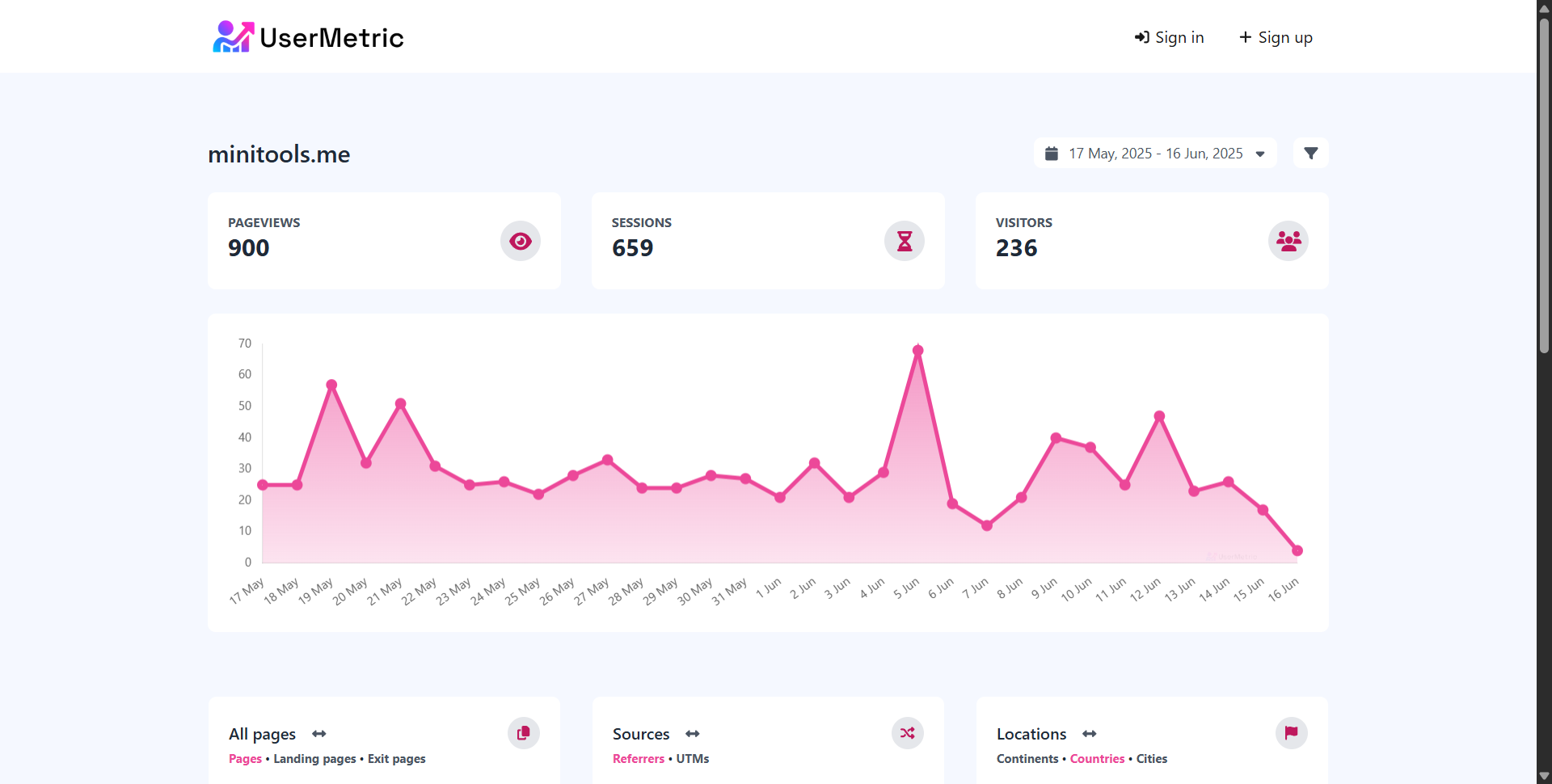
It offers a simple, fast, and compliant way to track your website performance.
🔒 Privacy Highlights:
- 100% cookieless tracking
- No IP storage or fingerprinting
- Fully GDPR, CCPA, and PECR compliant
⚙️ Key Features:
- Real-time analytics with metrics like pageviews, sessions, visitors, devices, locations, UTMs, and more
- Goal and conversion tracking without cookies
- Public dashboards, email reports, API access, and white-labeling
- Advanced tracking mode (optional): Enables heatmaps, session recordings, and event analytics for deeper insights
🚀 Why marketers love it:
- Installs in 30 seconds
- Ultra-lightweight script (just 2.7kB)
- Optimized for SEO, page speed, and performance
- No cookie banner required
- Built specifically for SaaS, blogs, and eCommerce
Usermetric is used by 500+ websites and trusted by founders who want privacy without sacrificing power.
Fathom, Plausible, and Simple Analytics Compared
While Usermetric leads in flexibility and feature depth, these tools are also strong options:
Fathom Analytics
- Fast, privacy-focused, and simple
- US and EU data residency options
- Supports event tracking and simple goals
- Clean dashboard with basic insights
Plausible Analytics
- Open-source and popular among developers
- Cookieless tracking and GDPR-friendly
- Great for smaller sites and content blogs
- Offers custom events, API, and dashboards
Simple Analytics
- Offers unique features like tweet tracking and CSV exports
- UI is very clean and beginner-friendly
- No cookies or IPs collected
- Slightly more expensive for advanced features
Each has its strengths, but Usermetric stands out for its complete mix of simplicity, customization, advanced tracking, and marketing insights.
How to Set Up Privacy First Analytics on Your Website
Now that you’re sold on the why, let’s talk about the how.
Getting started with privacy first analytics is quick and painless. Most tools (especially Usermetric) can be set up in under a minute.
Install in 30 Seconds with a Lightweight Script
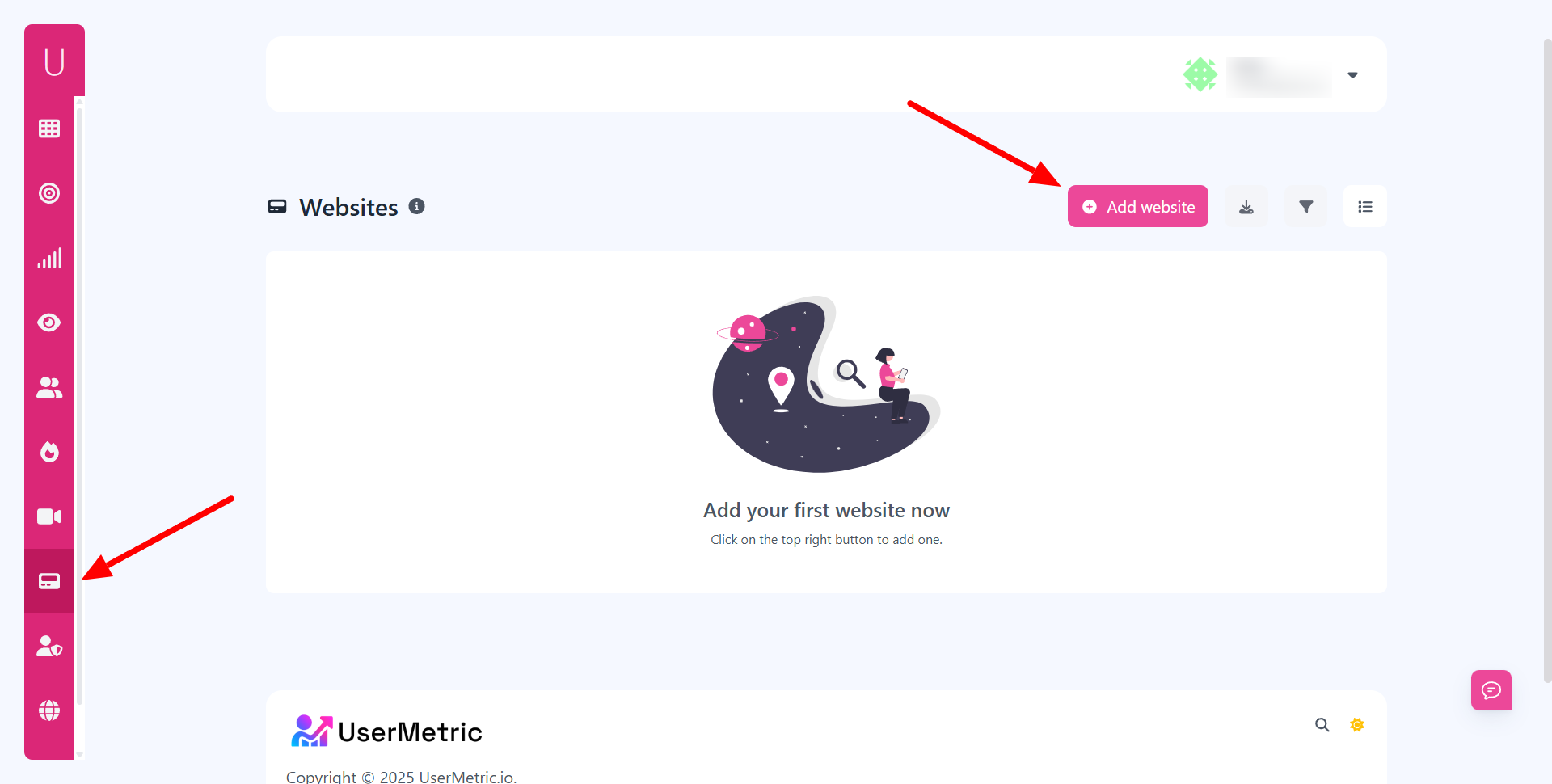
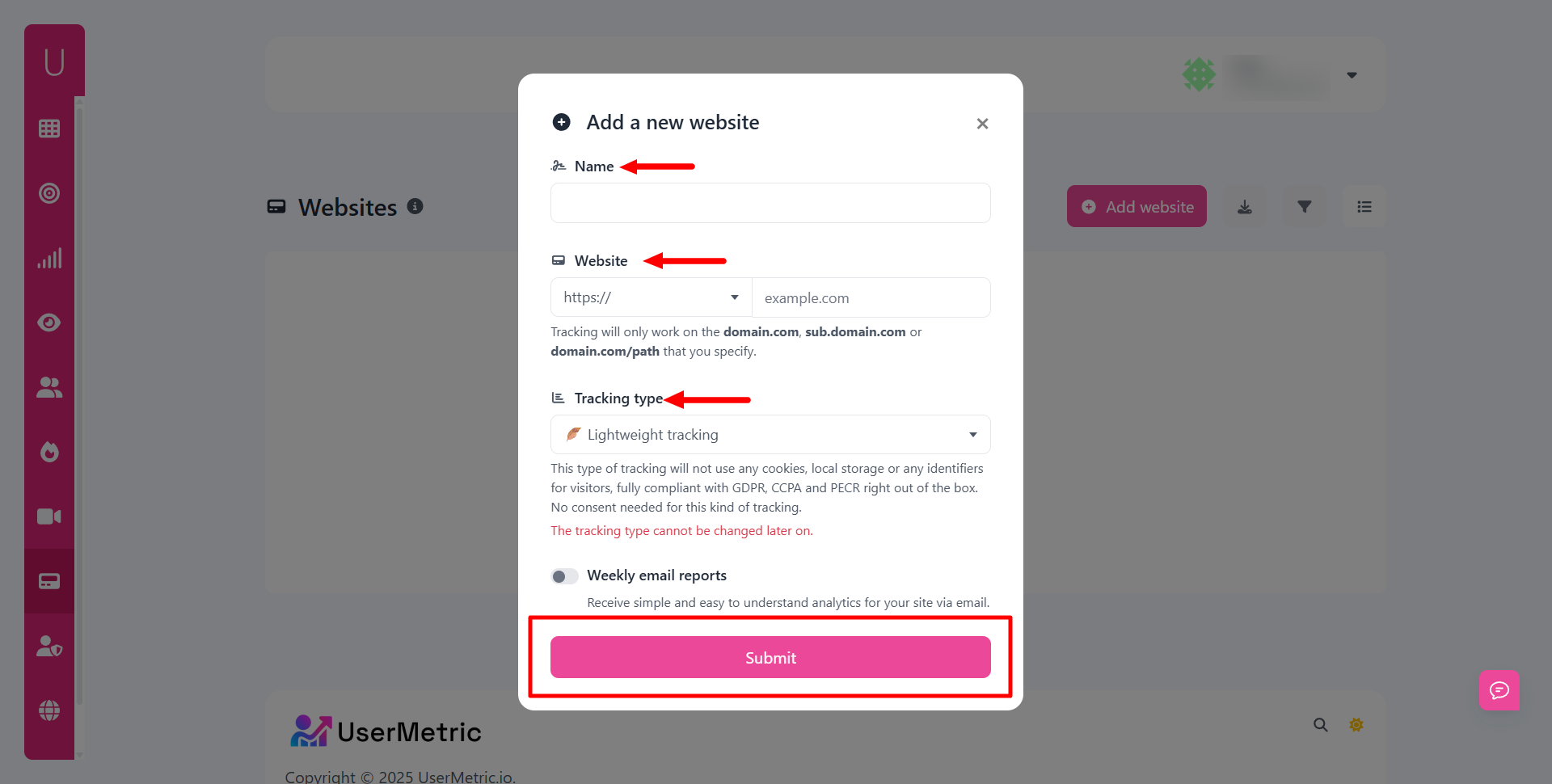
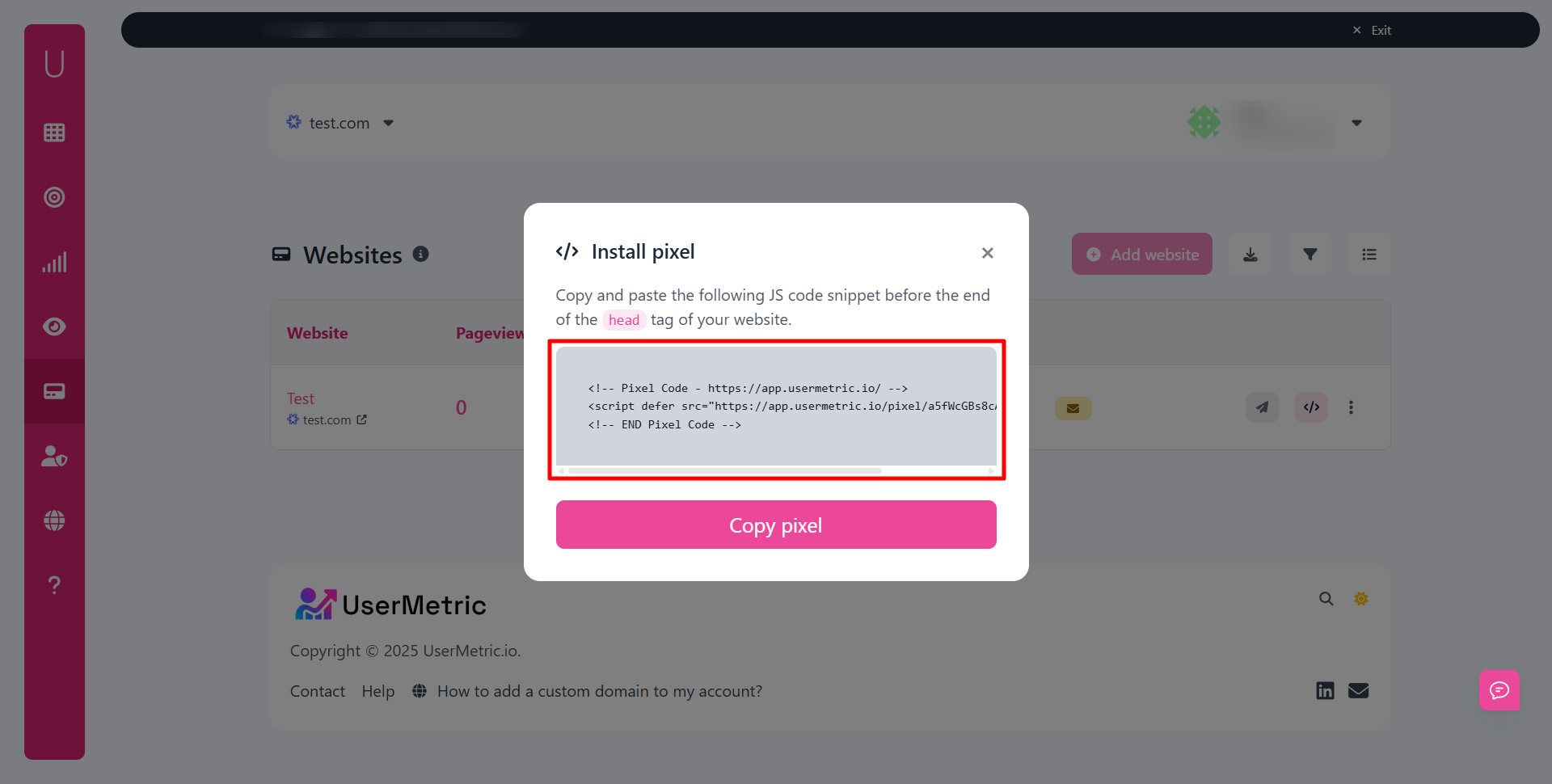
Here’s how to install Usermetric:
- Sign up for a free or paid plan
- Copy your unique script tag
- Paste it into your website’s
<head>tag
That’s it. No consent mode. No extra configuration. No waiting for Google Tag Manager.
It works on:
- HTML websites
- WordPress (via header injection plugin)
- Webflow, Shopify, Ghost, and other platforms
You’ll start seeing traffic instantly in your dashboard.
Track Events and Conversions Without Cookies
Need to know who clicked “Buy” or submitted a signup form?
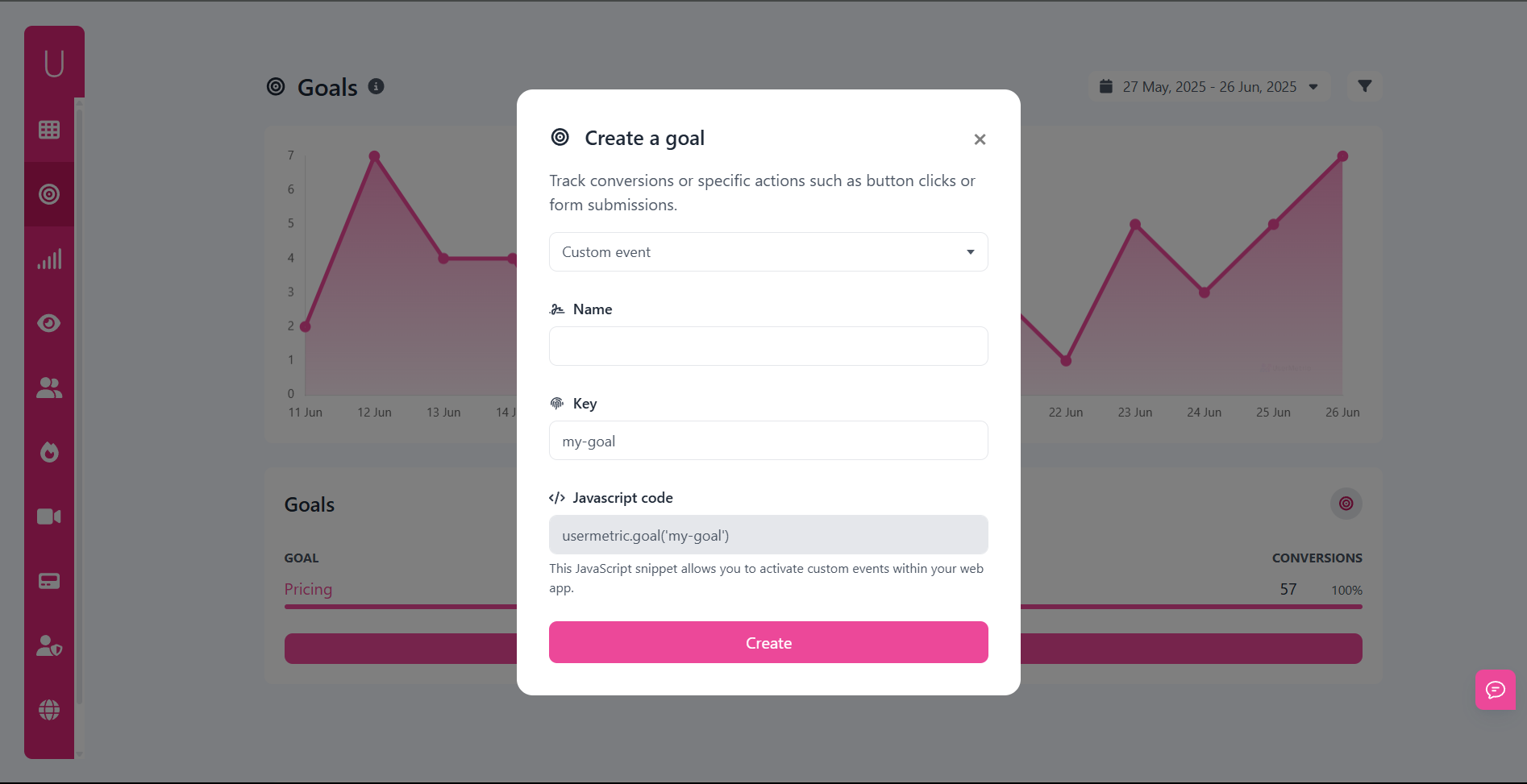
With Usermetric, you can track events like:
signup_submittedcheckout_startedcontact_form_submitted
You just add a small line of code to the button or form:
<script>
usermetric.track('signup_submitted');
</script>
Then define that event as a goal conversion inside your Usermetric dashboard.
You’ll instantly see how many users convert, which pages they came from, and what campaigns drove results.
All without cookies.
Monitor Campaigns with UTM and Referrer Data
You’re running paid ads. Promoting on social media. Partnering with affiliates.
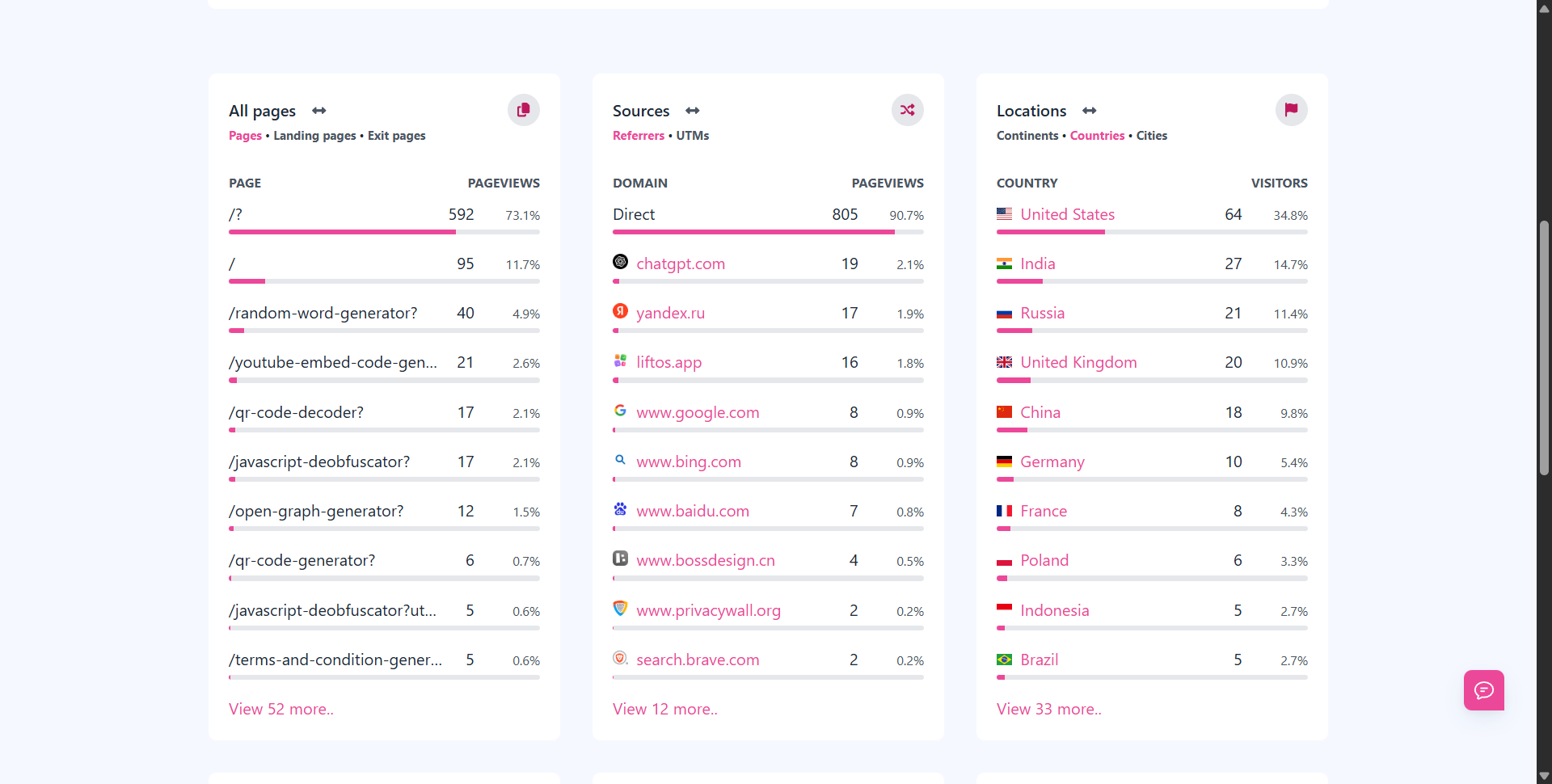
You need to know what’s working. Privacy first analytics still gives you:
- UTM tracking: Source, medium, campaign, content, term
- Top referrers: Know which sites send you traffic
- Landing pages: See where people enter your site
- Exit pages: Find where they drop off
None of this requires personally identifiable info. Just smart URL parameters and smart design.
Common Myths About Privacy First Analytics
Despite the growing popularity of privacy first analytics, some outdated myths still circulate.
These misconceptions often keep businesses stuck with complex, bloated, and non-compliant tools like Google Analytics.
Let’s clear the air and debunk the most common myths, once and for all.
“You Can’t Track Anything Without Cookies” — False
This is the biggest myth and it’s just flat-out wrong.
You absolutely can track important website metrics without cookies, and in many cases, the data is more reliable because it’s not diluted by blocked scripts, ad blockers, or bad cookie consent configurations.
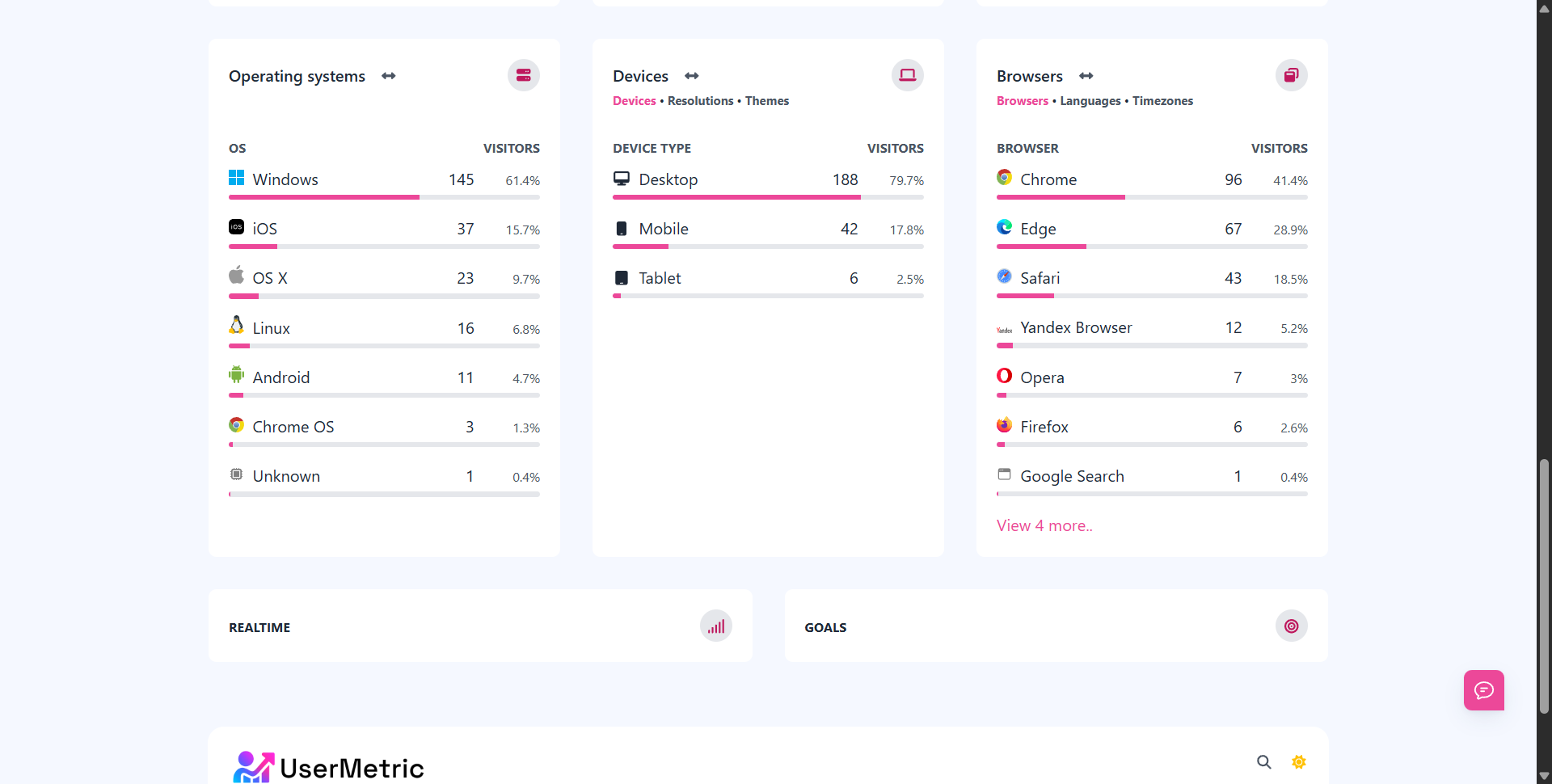
Here’s what you can track without cookies:
- Pageviews
- Country & city, browser, device, OS, language,
- Visitors (based on anonymized, non-persistent data)
- Bounce rates
- Referrers
- UTM campaigns
- Landing pages
- Goals and conversions (via custom events)
Tools like Usermetric do all of this without setting a single cookie or fingerprinting user identities.
You don’t need cookies. You need clarity.
“Privacy First Tools Are Basic” — Not Anymore
This myth was once true. In the early days, privacy focused analytics tools offered barebones dashboards with limited filtering and no flexibility.
That’s changed.
Modern tools like Usermetric, Plausible, and Fathom offer robust features, including:
- Conversion tracking
- Real-time reporting
- Email summaries
- Public dashboards
- UTM performance tracking
- API access
- Team collaboration
Some even support advanced tracking modes (like heatmaps and session replays), if you need deeper insights.
Privacy-first no longer means feature-poor. It means smartly focused and legally safe.
“Compliance Tools Are Hard to Use” — They’re Actually Easier
Legal compliance often sounds like a headache.
But with privacy first analytics, the tools are built to be compliant by default, so you don’t have to manage cookie popups, consent frameworks, or complex configurations.
Here’s why they’re easier:
- No cookie banners
- No legal add-ons or consent APIs
- No server-side configuration required
- No tracking code updates every few months
Just install a script and go. These tools are often easier than setting up Google Analytics or Tag Manager.
Is Privacy First Analytics Right for You?
Still wondering if you should make the switch? Here’s a practical guide to help you decide.
Checklist for Choosing a Privacy Focused Tool
Use this quick checklist to evaluate if privacy-first analytics is a good fit:
✅ You want to remove cookie banners from your website
✅ You’re concerned about GDPR, CCPA, or PECR compliance
✅ You value user trust and brand transparency
✅ You need fast, accurate insights without complex dashboards
✅ You’re looking for a solution that’s easy to install and manage
✅ You want analytics that focus on real behavior, not vanity metrics
If you checked even three, privacy first analytics is a smart move.
Who Should Switch from Google Analytics?
Google Analytics is powerful, but it’s overkill for many users, especially if you’re not using advanced ecommerce funnels or heavy segmentation.
You should switch if:
- You’re running a small business, SaaS product, or blog
- You care about compliance and don’t want the legal risk
- You dislike managing cookie banners and scripts
- You find GA’s interface overwhelming or hard to use
- You’ve stopped trusting the accuracy of your GA reports
- You want a faster site with fewer third-party scripts
For many businesses, privacy first tools are simpler, faster, and just make more sense.
Why Now Is the Time to Make the Move
Here’s why switching today makes sense:
- Google Analytics is being restricted in many EU countries
- Data privacy regulations are expanding globally
- Users are demanding transparency more than ever
- Browser privacy features are growing, blocking third-party cookies by default
- Privacy-first tools are ready and mature, they’re no longer “alternatives” but solid replacements
Every month you wait adds more technical debt, compliance risk, and user friction to your stack.
Today is the perfect time to move, before it’s no longer optional.
Final Thoughts
As the web evolves, user privacy is no longer just a legal checkbox, it’s a foundational expectation.
Analytics doesn’t need to come at the cost of user experience or ethical concerns.
Respecting Privacy Doesn’t Mean Losing Insights
In fact, it’s the opposite. By switching to privacy-first analytics:
- You get cleaner data
- You build more trust
- You ensure legal safety
- You keep your website faster and simpler
Instead of collecting everything, you focus on what actually matters: understanding your audience, improving your site, and growing your business.
You trade complexity for clarity.
FAQs
Do privacy-first analytics tools really not need cookie banners?
Yes. Tools like Usermetric, Fathom, and Plausible don’t use cookies or track personal data, so you’re not required to show a consent popup under GDPR or CCPA.
Will I lose important data by switching from Google Analytics?
No. You’ll still get key insights like pageviews, sessions, referrers, top content, conversions, and UTM data. In fact, your data may be more accurate since it’s not blocked by browsers or ad blockers.
Are these tools suitable for eCommerce sites?
Yes, especially if you use goals and event tracking. You can monitor checkout flows, signups, and more without violating user privacy.
Is Usermetric free to try?
Yes. Usermetric offers a free plan so you can get started and test the platform risk-free.
What if I still want deeper insights like heatmaps or session replay?
Usermetric offers advanced tracking mode (opt-in), which gives you access to heatmaps, event tracking, and more while staying compliant with consent requirements.


